InsightGo Redesign

Rethinking how home-care therapists manage their schedules through a mobile-first InsightGO experience built for the field.

Project Scope

Concept redesign

Concept redesign

My Role

UX/UI Designer

UX/UI Designer

Team

Solo

Solo

Tools

Figma, Miro, Zoom, Google Workspace

Figma, Miro, Zoom, Google Workspace

Project Scope

Concept redesign

My Role

UX/UI Designer

Team

Solo

Tools

Figma, Miro, Zoom, Google Workspace

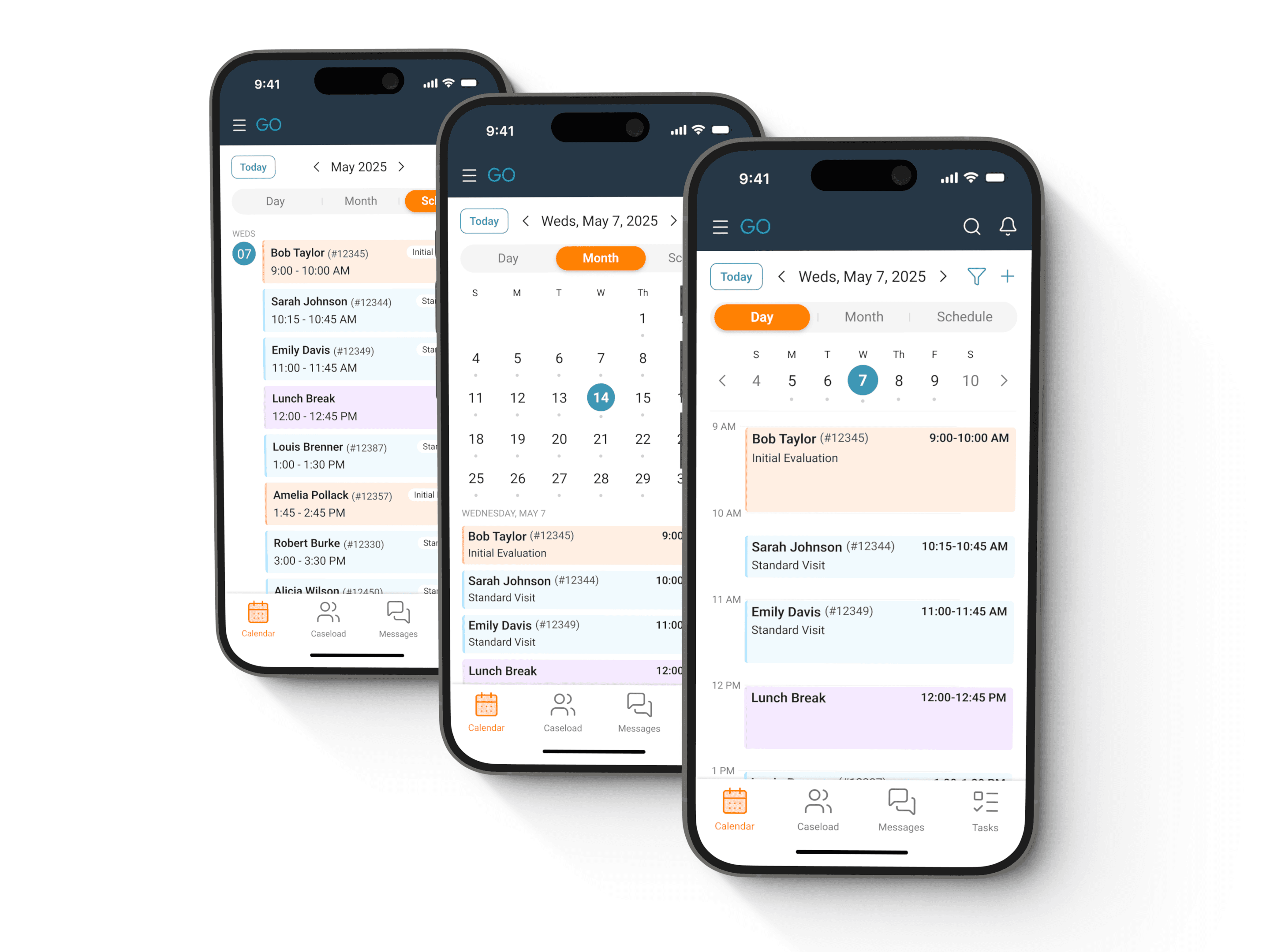
Three iphones displaying various schedule views

Project Overview & Context

As a home-care Speech Pathologist, I relied on insightGO’s mobile app to manage my schedule. However, what should’ve been a quick glance between patients became a daily struggle. Tiny text, unresponsive tap targets, and layouts that didn't adapt to mobile screens forced me to waste valuable minutes wrestling with the interface instead of focusing on care.

This isn’t just my experience. Therapists across rehab disciplines face the same hurdles: schedule interfaces that don’t work on mobile, buried actions requiring 5+ taps, and workarounds like screenshots or paper notes just to get through the day. In a field where time directly impacts patient outcomes, poor mobile design is both frustrating and unsustainable.

This self-initiated redesign rethinks insightGO’s mobile scheduling from the ground up, combining firsthand clinician insights with mobile-first UX principles.

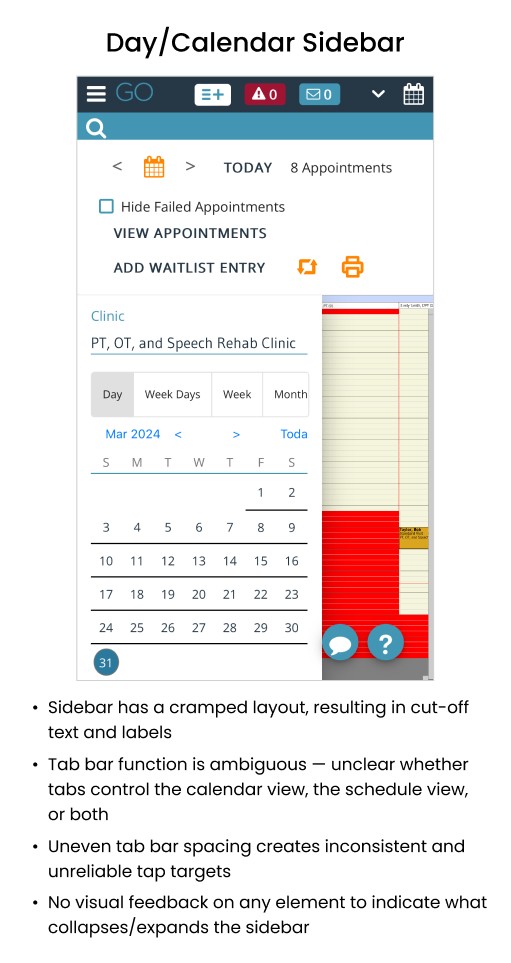
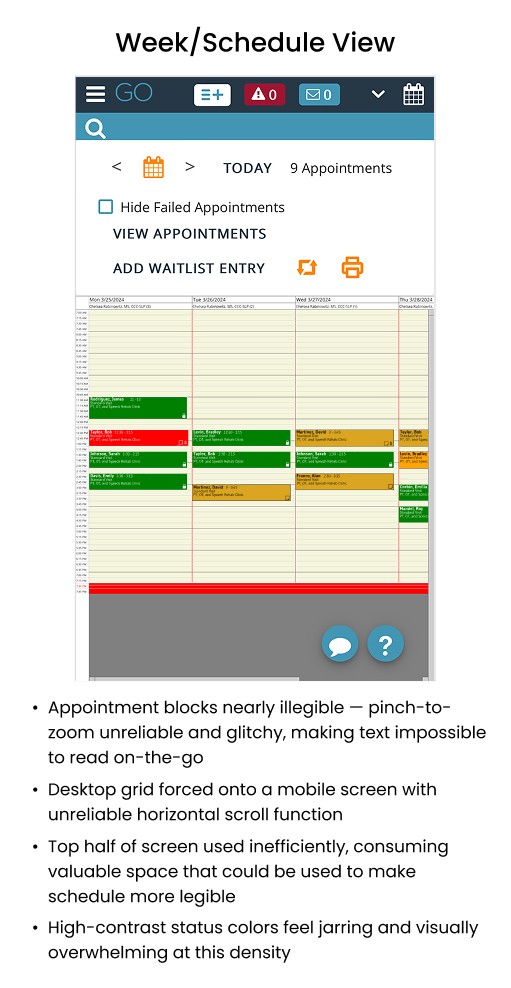
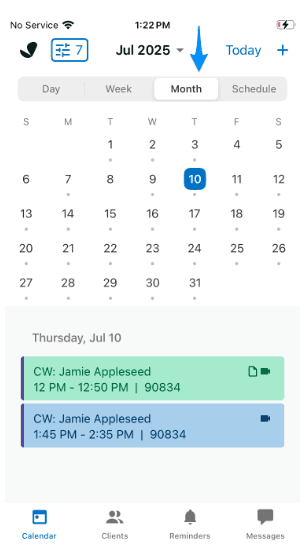
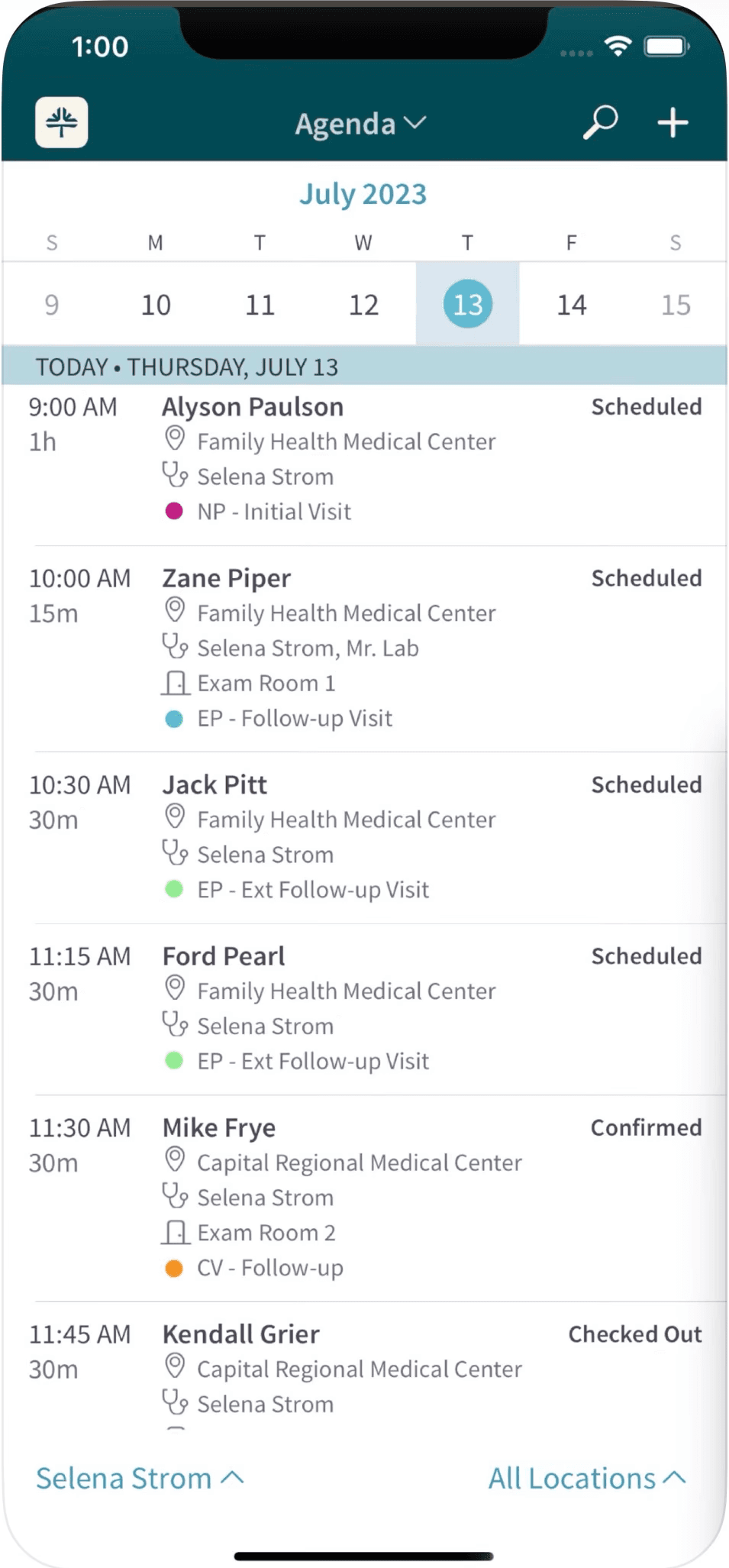
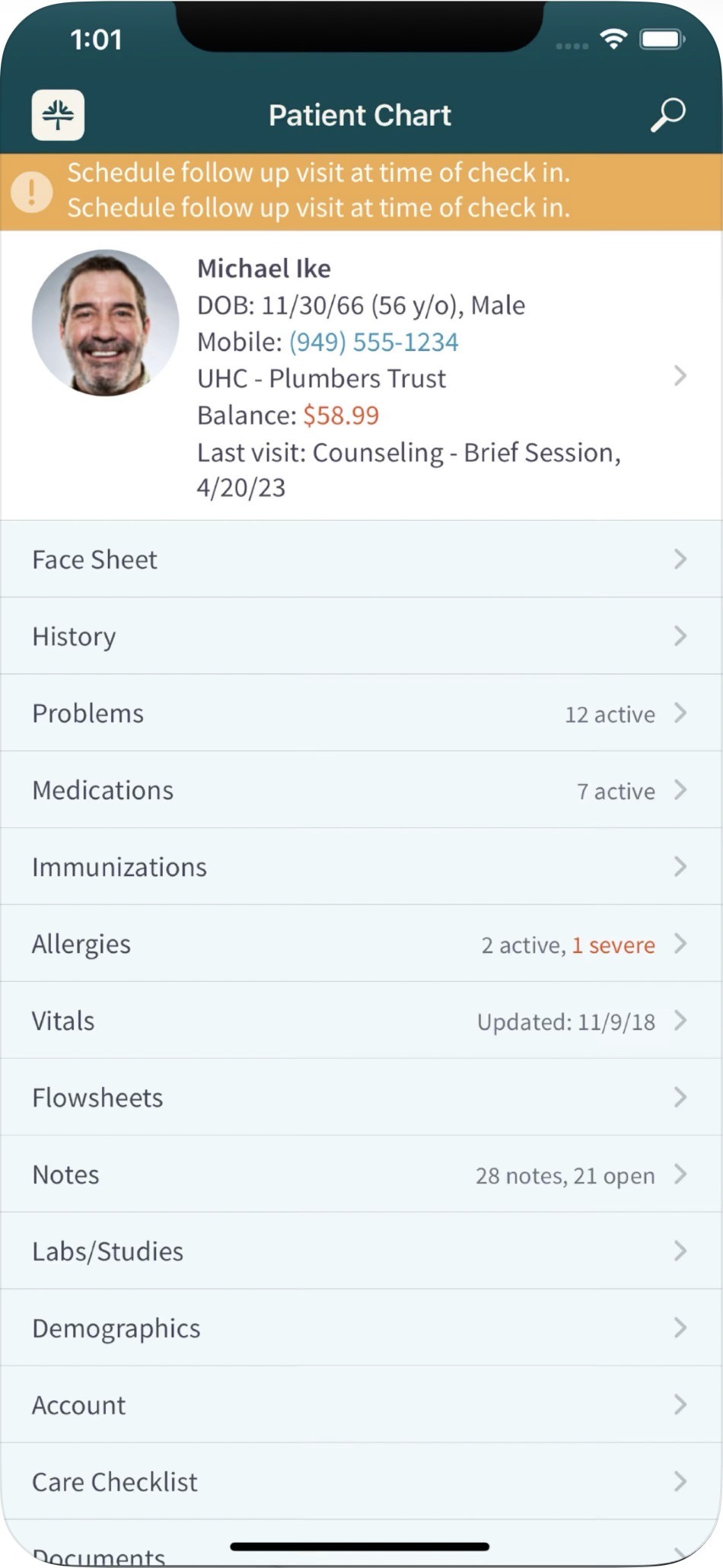
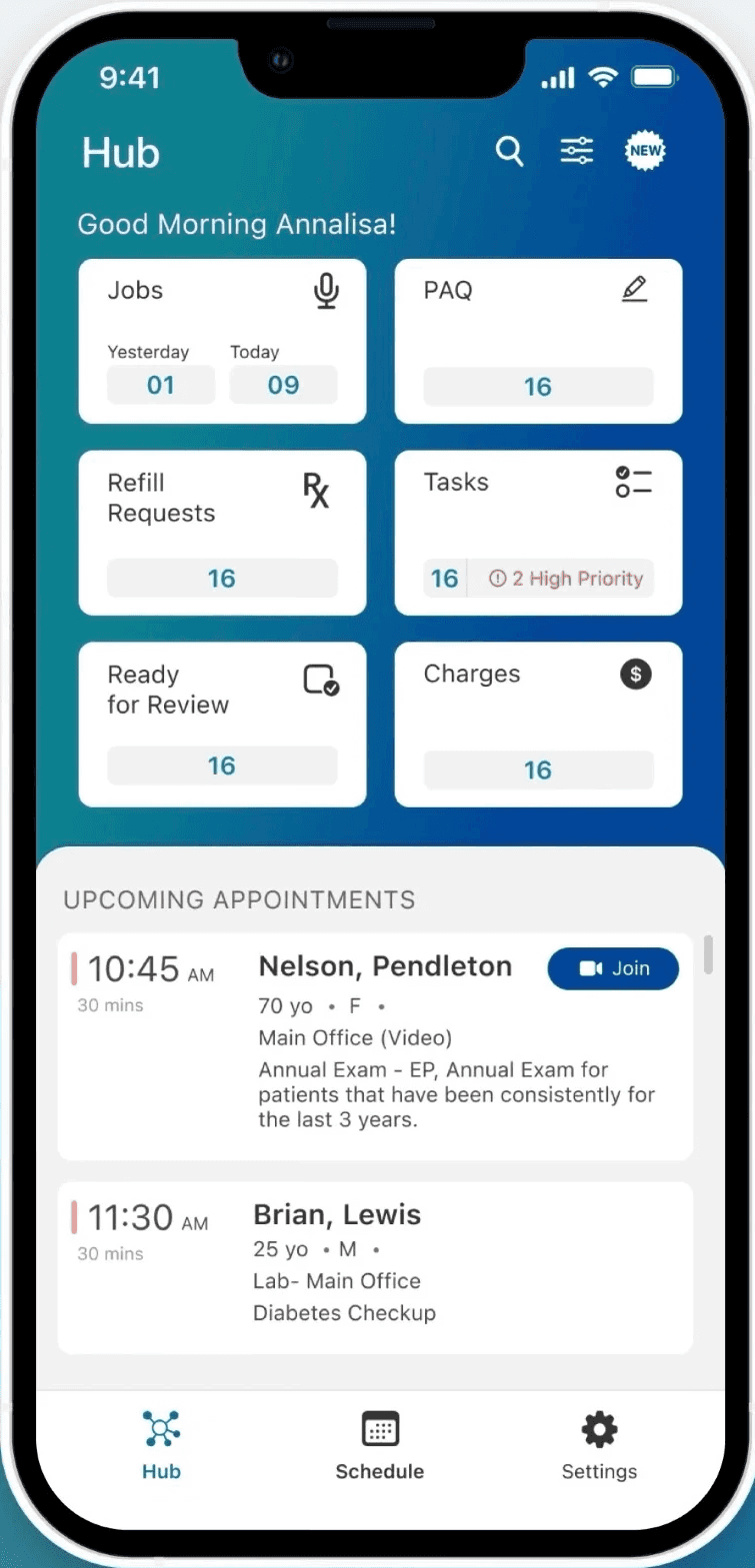
Before diving into the redesign, here's a look at InsightGO's current mobile experience — the navigation, calendar, and schedule views that therapists rely on daily.

*Note: This is an independent concept project. I am not affiliated with InsightGO or WebPT. All patient names and identifying information visible in these screenshots are fictional — original data has been redacted to protect patient privacy.
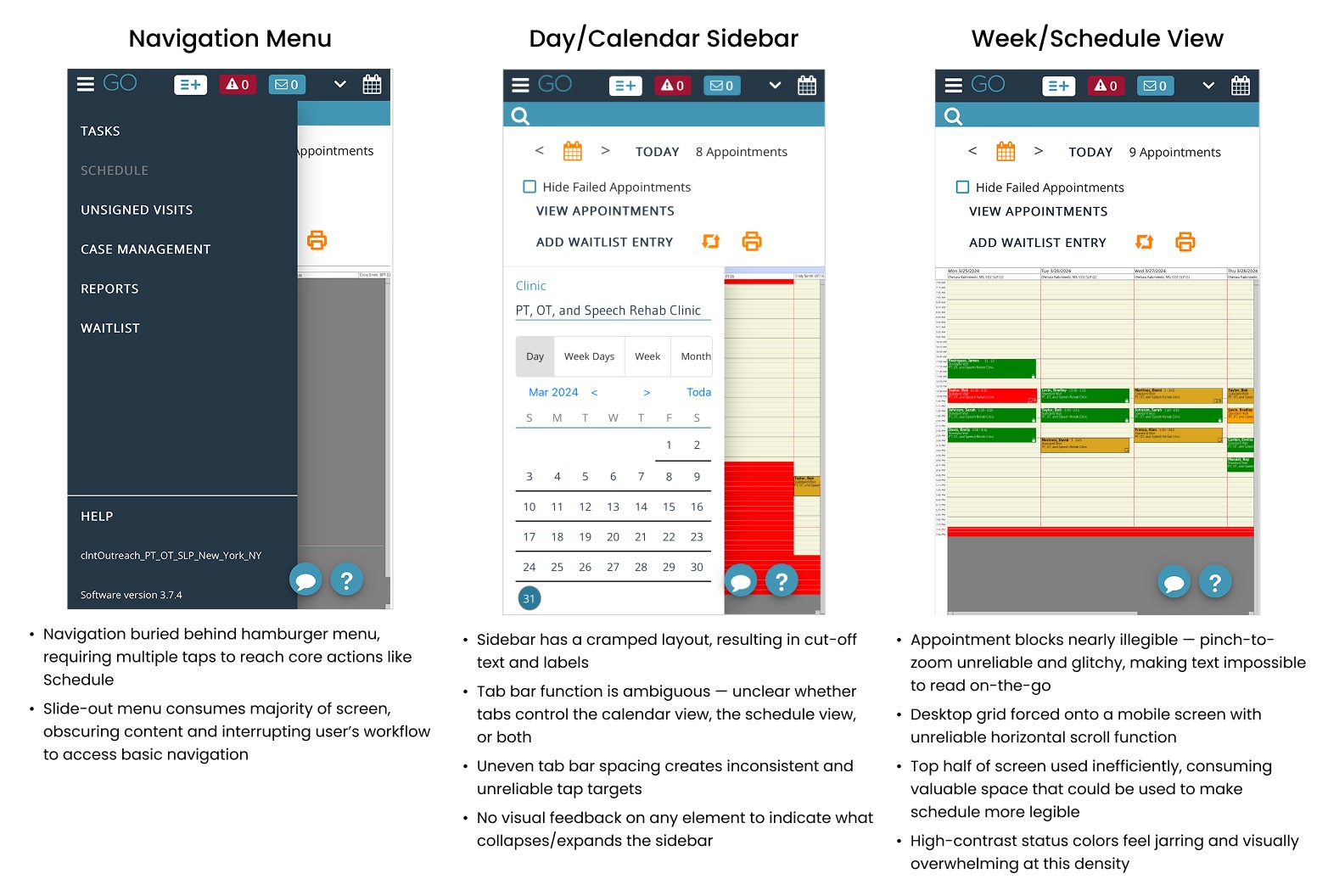
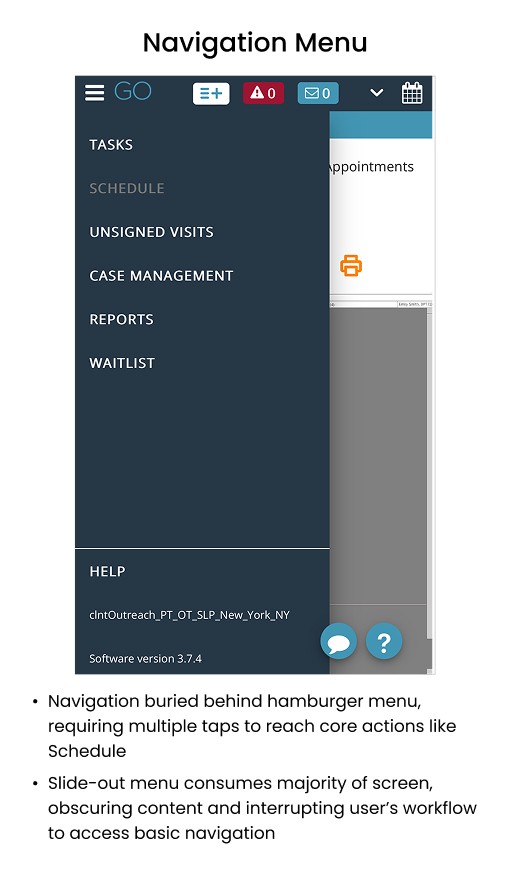
Three screenshots showing InsightGO's current mobile interface for navigation, calendar, and schedule
e navigation menu
e navigation menu
Screenshot of InsightGO's current mobile interface for the calendar sidebar
Screenshot of InsightGO's current mobile interface for the schedule view

The Problem

Therapists need to check, manage, and update their schedules quickly while on-the-go. InsightGO's current mobile interface makes this unnecessarily difficult: text is too small to read, tap targets are unreliable, and basic actions require multiple attempts or a switch to desktop. The result is a reliance on workarounds like screenshots and personal calendar apps, leading to inefficient workflows, compliance risks, and administrative work that bleeds into unpaid time.

The Problem

Therapists need to check, manage, and update their schedules quickly while on-the-go. InsightGO's current mobile interface makes this unnecessarily difficult: text is too small to read, tap targets are unreliable, and basic actions require multiple attempts or a switch to desktop. The result is a reliance on workarounds like screenshots and personal calendar apps, leading to inefficient workflows, compliance risks, and administrative work that bleeds into unpaid time.

The Solution

A mobile-first scheduling experience that makes it faster and easier for therapists to view, modify, and plan their appointments while on the go. The redesign introduces a simplified daily agenda view with clear visual hierarchy, larger touch targets for one-handed mobile use, and streamlined access to common actions like rescheduling or marking sessions as arrived, reducing the need for desktop access or insecure workarounds.

Project Goals

  • Create a glanceable daily schedule that therapists can scan quickly between visits

  • Reduce core scheduling actions (like rescheduling or viewing patient details) to as few taps as possible

  • Design touch-friendly interfaces that work reliably on mobile and tablet devices

  • Build trust through clear feedback and confirmation for every action

  • Lay the foundation for future mobile workflow improvements across the app

Understand

To better understand the problem space of this particular project, I needed to start with some research about InsightGO’s current competitors and users.

Competitor Research

Objective: to explore how well-known platforms design mobile calendar/scheduling experiences and extract patterns/features that could improve the InsightGO interface for therapists on-the-go.

Direct Competitors (EHR Platforms):
  • SimplePractice

  • NextGen Mobile Solutions

  • Tebra

Key Insights from Competitor Platforms:

1.

Vertical schedules work best for mobile

List-based schedules are clearer on smaller screens. Leading platforms also offer multiple view options (day, week, month) for flexibility.

2.

Color coding accelerates pattern recognition

Color-coded appointment blocks help users quickly identify session types, priority levels, or schedule conflicts.

3.

Progressive disclosure keeps interfaces scannable

Events show minimal info by default, with full details revealed on tap to reduce visual clutter.

4.

Centralized dashboards provide at-a-glance context

Events show minimal info by default, with full details revealed on tap to reduce visual clutter.

Empathize

User Research

As a therapist who personally used insightGO in the field, I had firsthand insight into its pain points. But as a UX designer, I knew it was important to separate my own experience from the broader user base. To ensure the redesign addressed a range of real-world needs, I conducted interviews with other therapists across different roles and settings.

Research Goals

  1. Understand how therapists currently use InsightGO's mobile scheduling feature in their day-to-day workflow.

  2. Identify key pain points and workarounds therapists use when managing appointments in the field.

  3. Uncover what therapists need most from a mobile scheduling experience to do their job effectively.

User Interviews

I interviewed 3 therapists who use InsightGO, each from a different rehabilitation discipline and setting. Participants were conducted via Zoom with 14 open-ended, conversational-style questions. Interviews took about 20-30 minutes each. Click here to see the full set of interview questions.
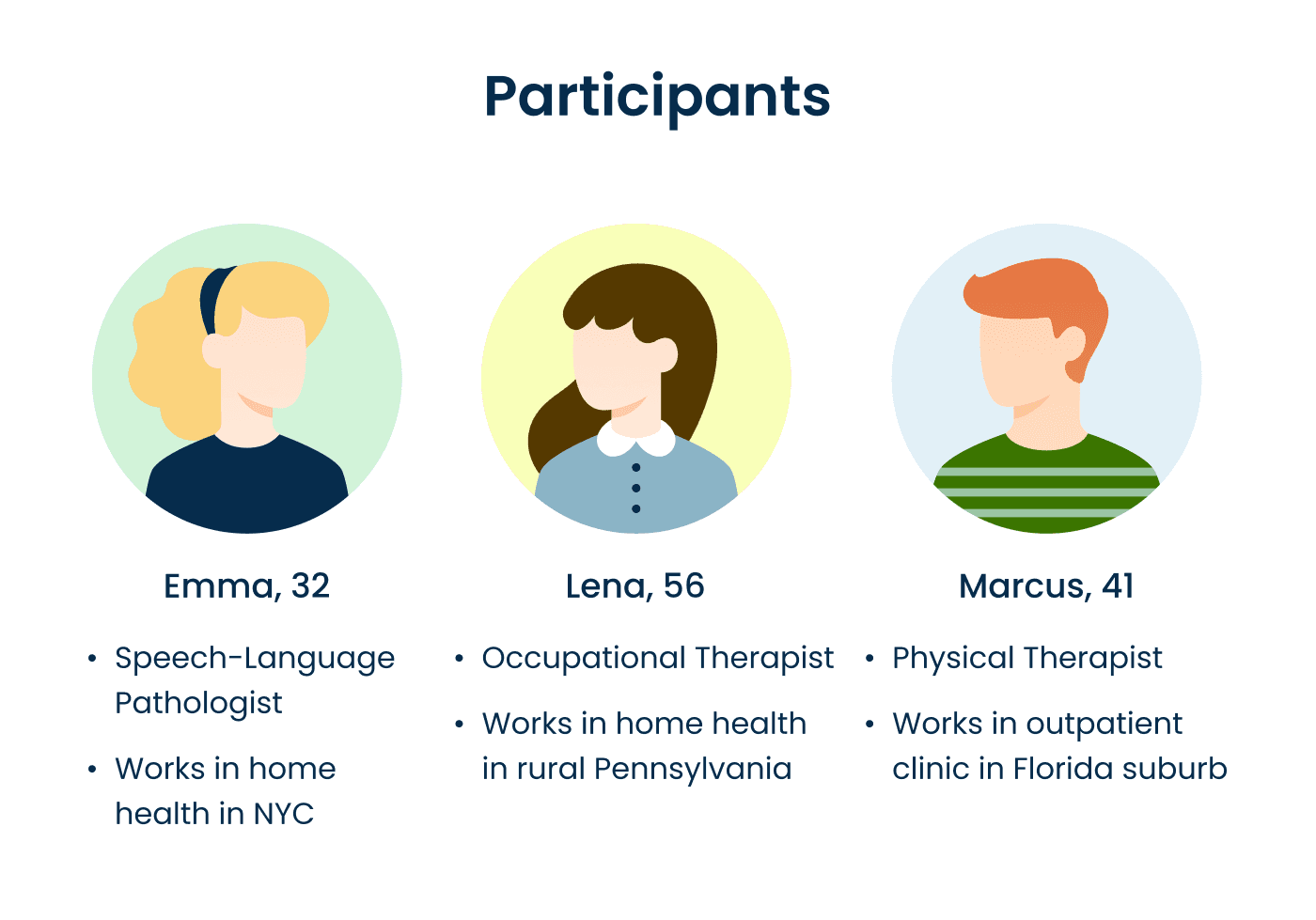
Infographic showing info about 3 participants

Analyzing the Data

To distill insights from user interviews, I conducted affinity mapping using Miro, iteratively grouping observations into 5 emergent themes reflecting therapists’ behaviors, needs, and frustrations regarding InsightGO’s platform.

Through consolidation of recurring patterns, five key insights emerged from the data:

Key Insights

1.

Small Screens, Big Hassle

Current mobile layouts force therapists to fight the UI for basic information, compounding stress during patient care.

2.

Broken Tools Lead to Compliance Risks

Clinicians resort to insecure workarounds like personal calendars and screenshots because the official tool fails them. Even coded identifiers can become PHI when paired with visit details, creating unintended HIPAA violations.

3.

Schedules Shouldn’t Be a Puzzle

The lack of a clear, at-a-glance schedule view forces therapists to mentally piece together their day, leading to confusion and errors in the field.

4.

UI Friction = Lost Time & Extra Work

Every inefficient or broken interaction results in unpaid labor from clinicians.

5.

Unreliable Functionality Undermines Trust

Performance issues (freezes, lost data) make therapists avoid mobile for critical tasks.

Proto-Persona

To keep design decisions grounded in real user needs, I created a proto-persona based on interview insights & patterns.
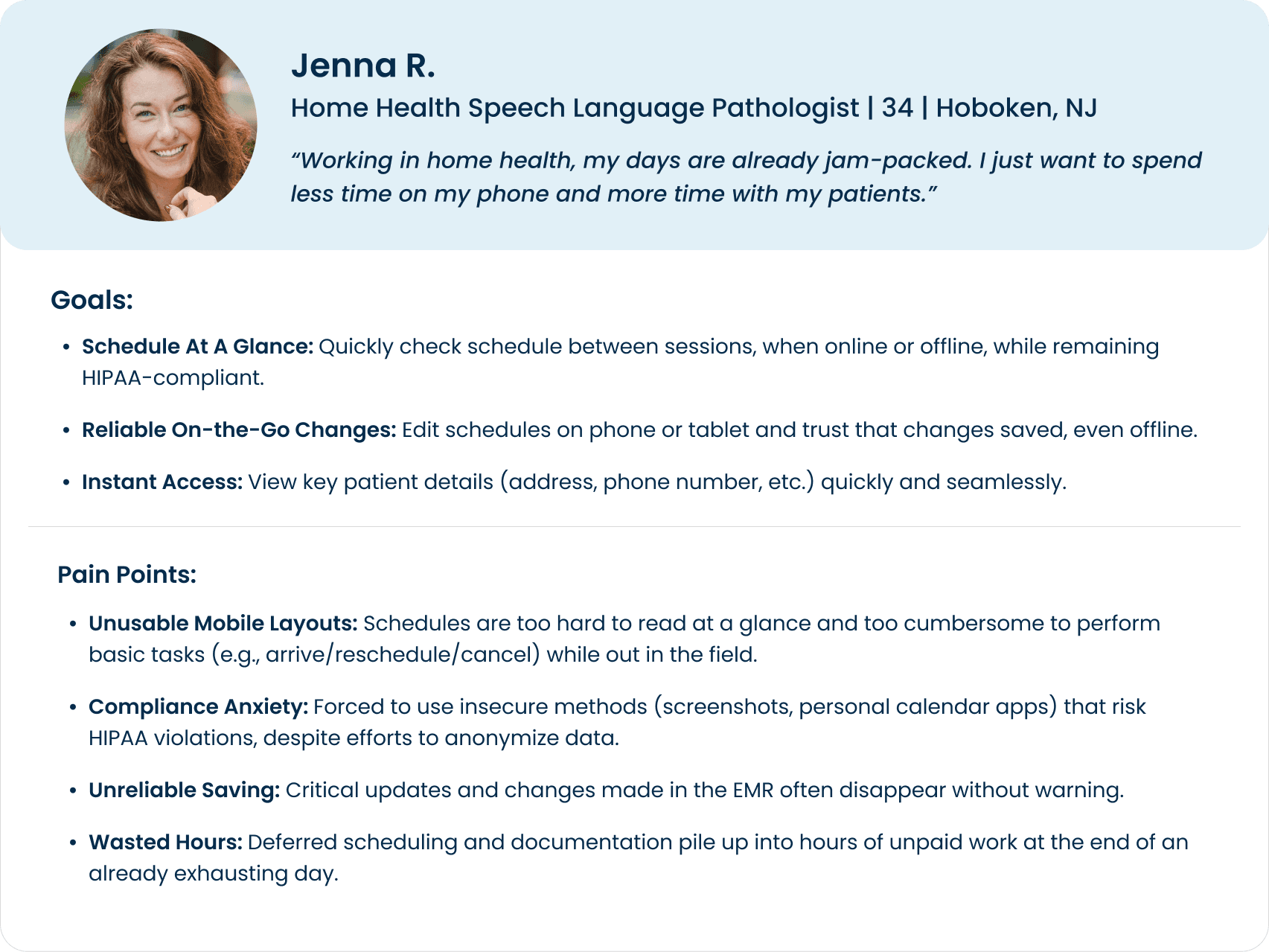
Image showing proto-persona with demographics, goals, and pain points

Journey Map

Mapping out Jenna's daily workflow helps reveal how mobile usability issues compound throughout the day, turning minor friction into hours of deferred work.
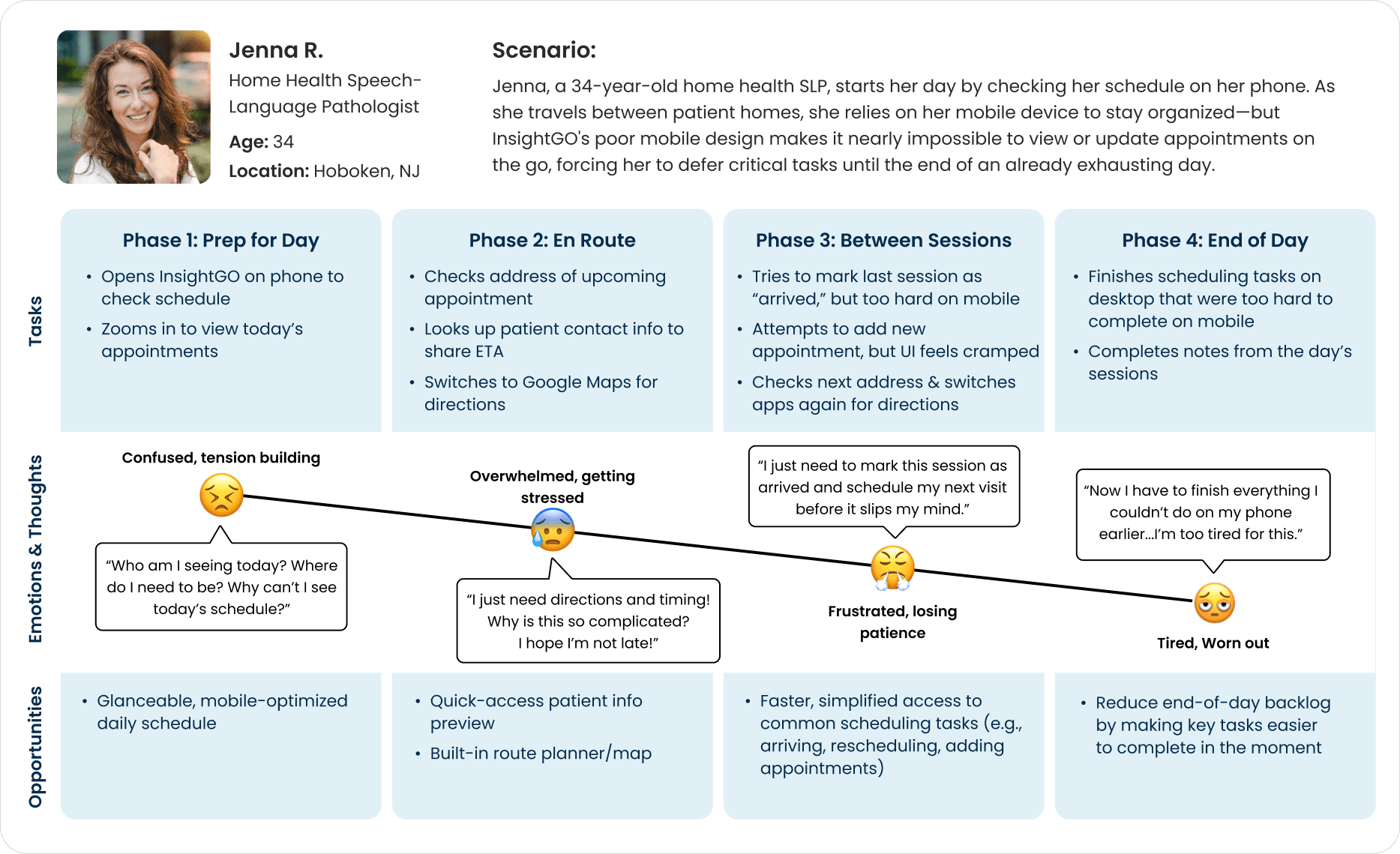
Image of user journey map

Ideate

After defining the core issues therapists face on mobile, I shifted focus to exploring how the experience could be reimagined to feel faster, cleaner, and more reliable. Since the scope of this redesign was intentionally kept narrow, I concentrated on a single user flow: viewing and managing a therapist’s daily schedule on mobile and tablet devices.

Framing the Opportunity

How might we design a scheduling experience that works seamlessly across mobile and tablet devices, helping therapists quickly access, understand, and manage their day without relying on workarounds or switching to desktop?

Design Priorities

Guided by UX best practices and shaped by the specific needs of therapists in the field, I defined a set of priorities to anchor the redesign:

  • Glanceability: The daily schedule should be easy to scan quickly between visits or even mid-session

  • Efficiency: Core actions like rescheduling/changing a session and viewing patient details should be easily accessible in as few taps as possible

  • Touch-Readiness: Tap targets should be large and responsive enough for one-handed use on the go

  • Simplicity over density: Prioritize clarity and legibility over trying to fit too much into one screen

  • Trust & Feedback: Every action should produce clear confirmation to reduce uncertainty and rework

Task Flows

To support therapists' needs, I mapped out common scheduling tasks as individual flows. Each one represents a frequent action, such as rescheduling, adding, or updating an appointment, which should be quick and intuitive to complete on mobile. These flows helped guide design decisions around layout, interaction, and hierarchy.
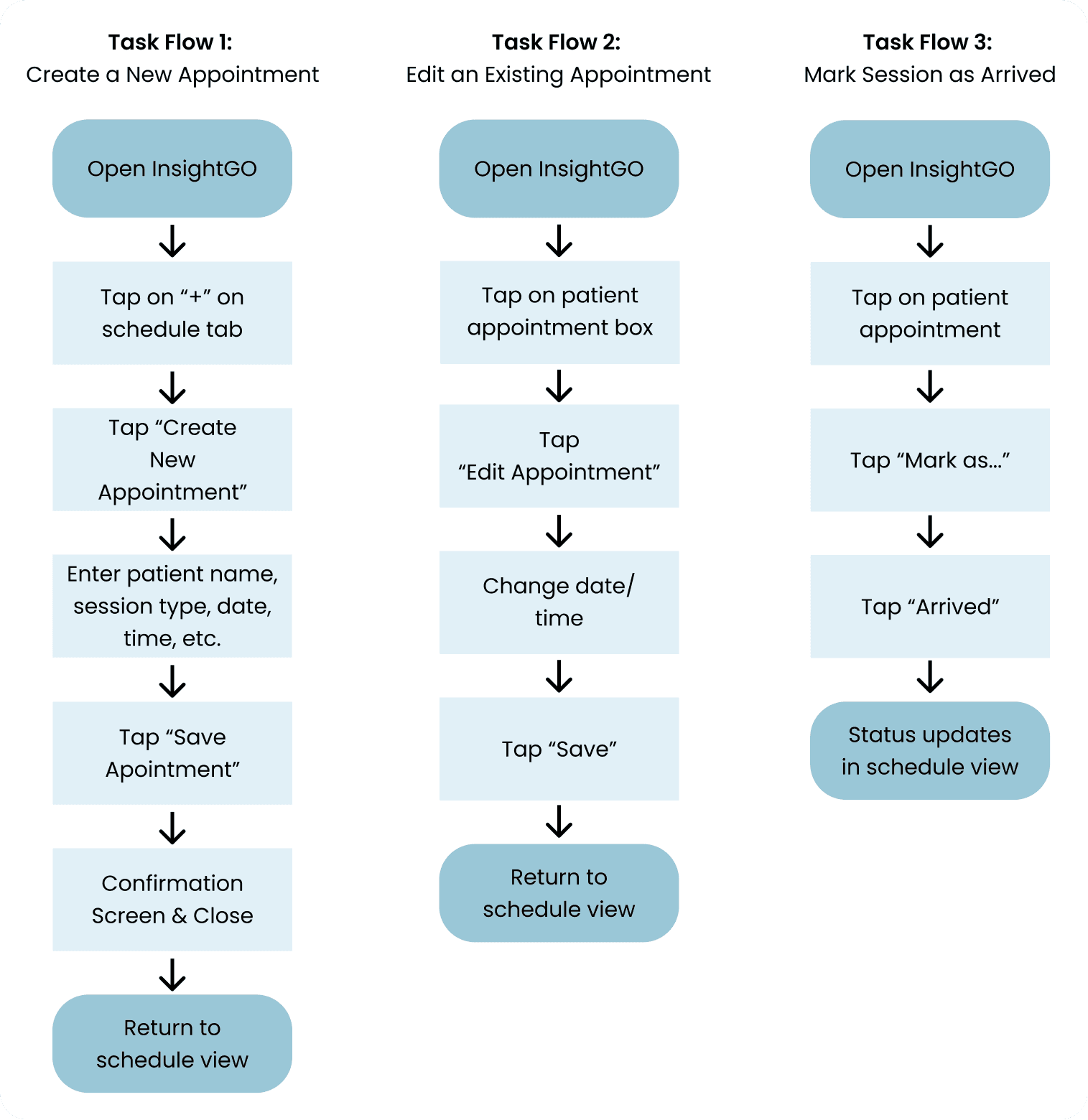
Task flow diagrams for 3 user flows

Design

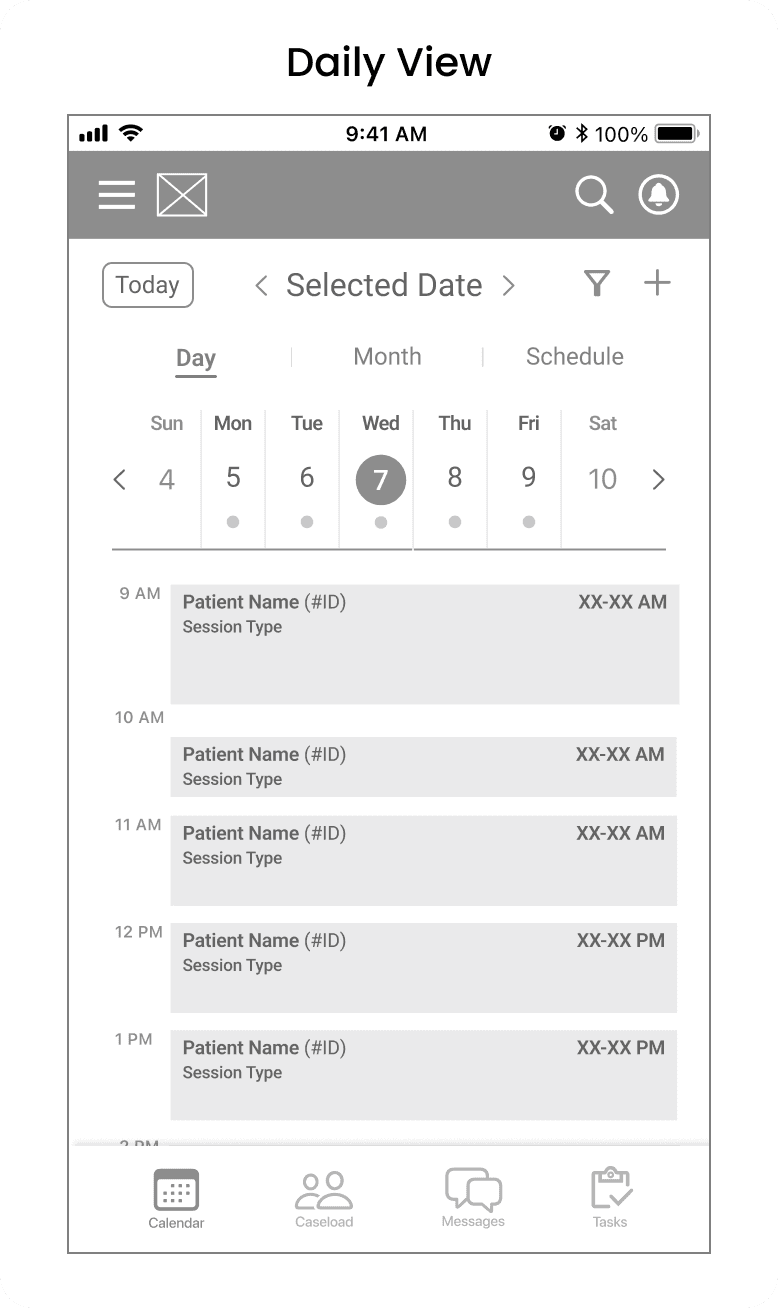
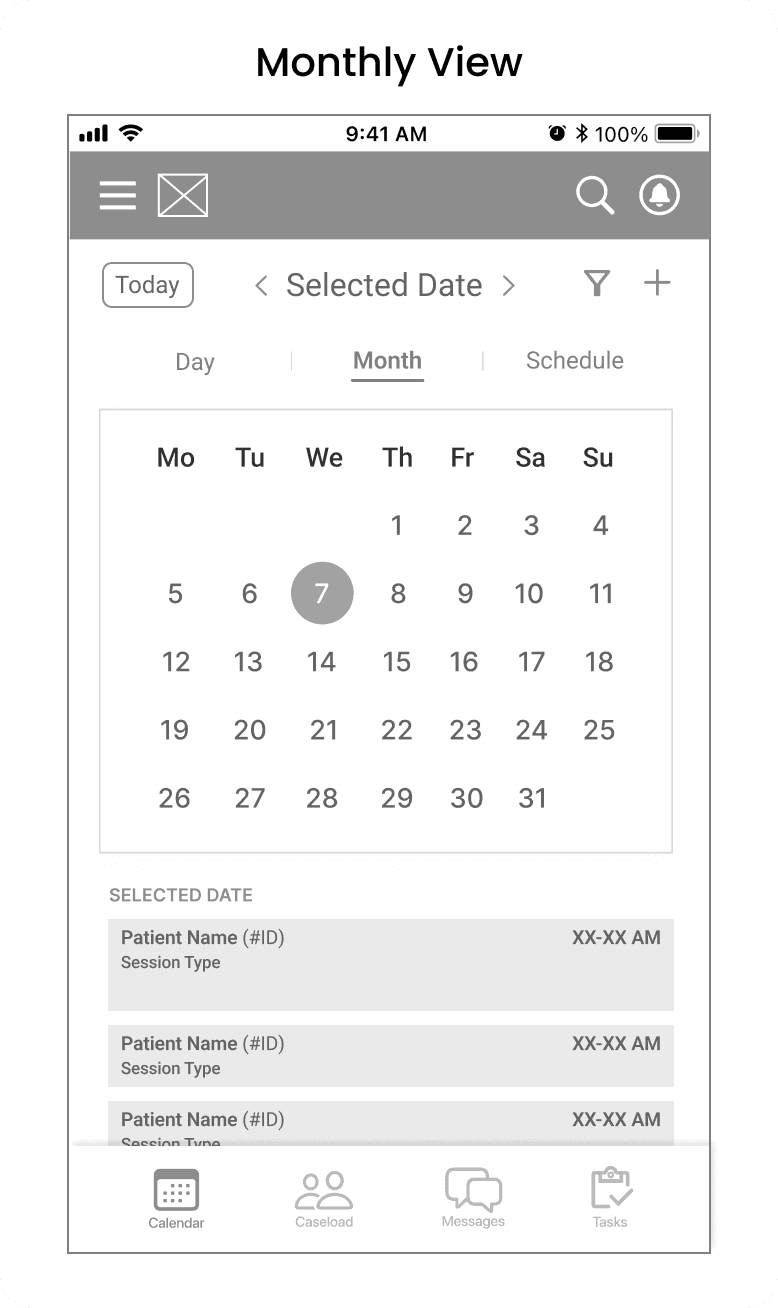
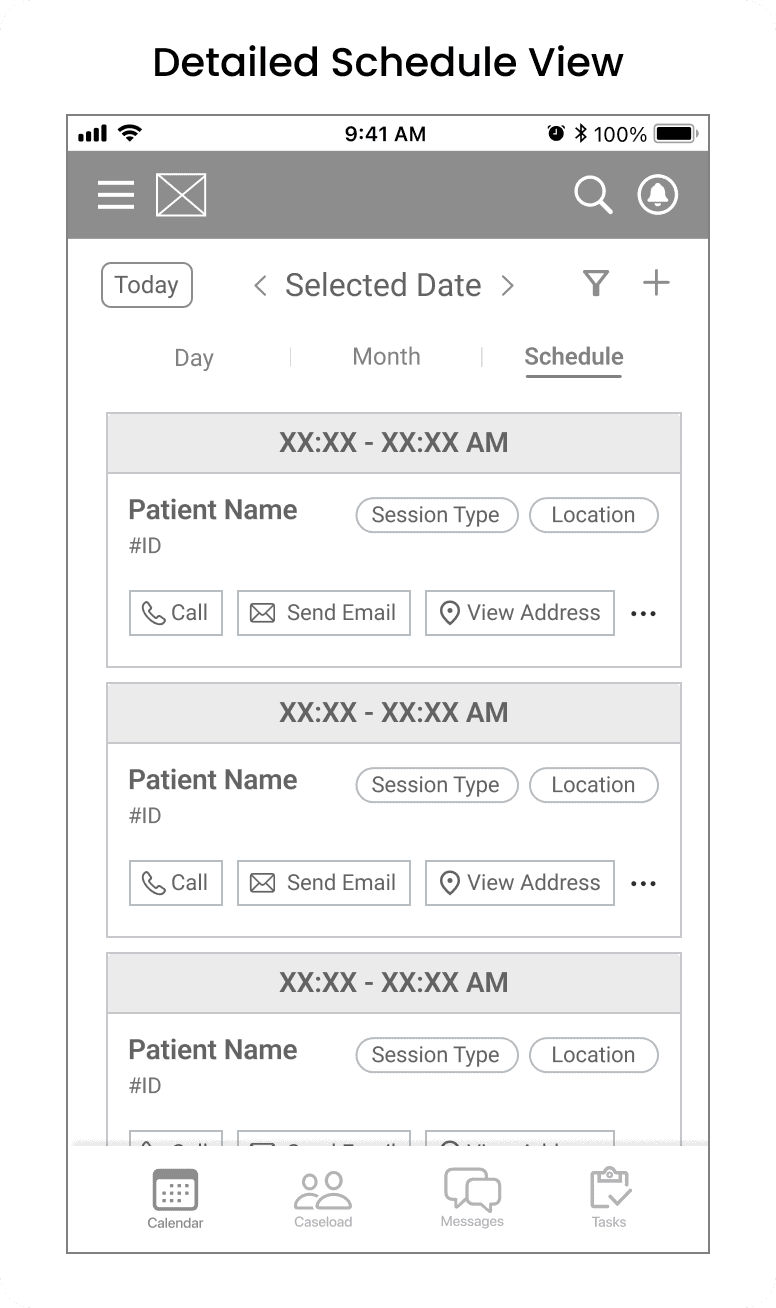
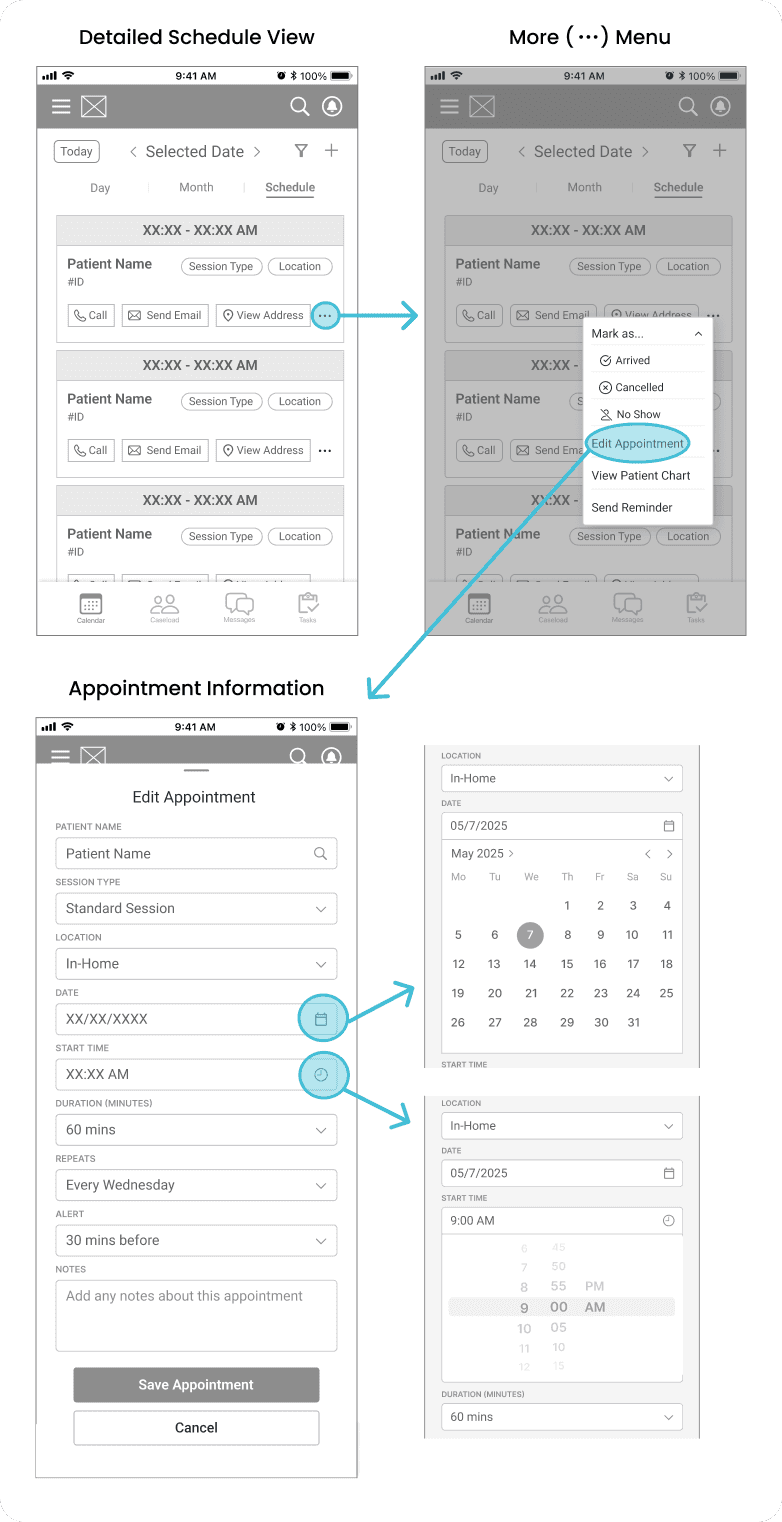
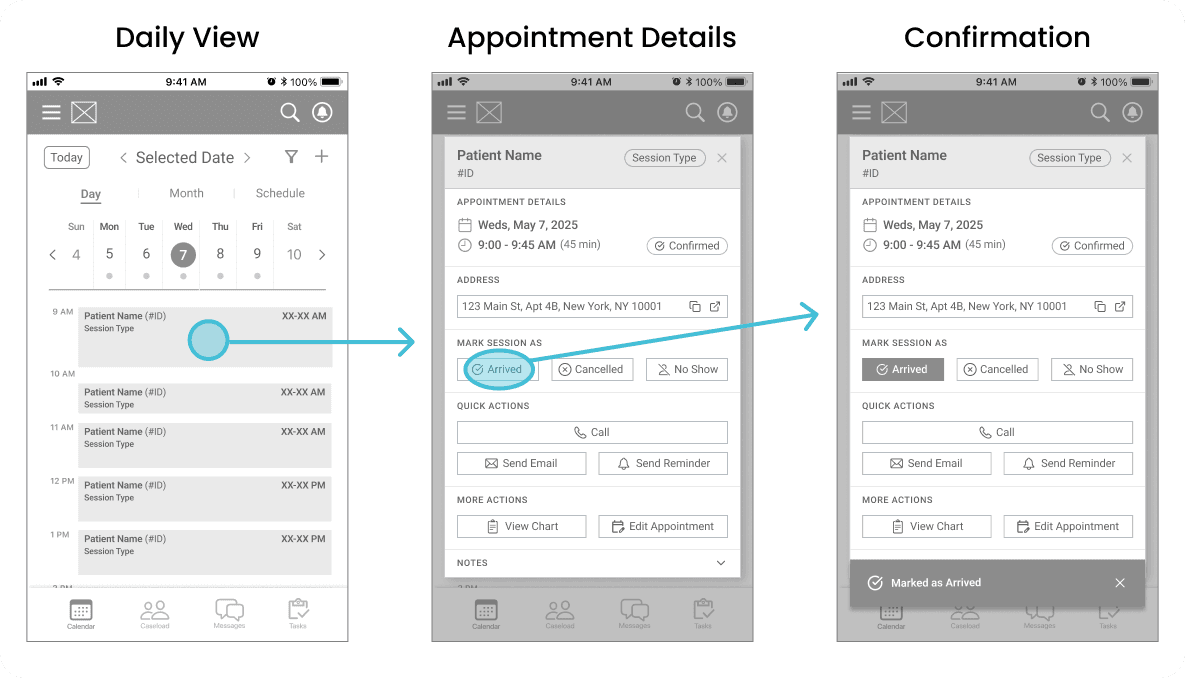
With a clearly defined scope, I moved directly into mid-fidelity wireframes to reimagine insightGO’s mobile scheduling experience. As this project was a redesign of an existing system, my focus was on optimizing core flows — viewing, editing, and adding appointments — rather than reinventing them. Skipping low-fidelity sketches allowed me to iterate quickly while applying UX best practices around clarity, hierarchy, and mobile usability.

Take a look below to see my early wireframes exploring each of the key scheduling flows in the redesigned mobile experience.

Mid-Fidelity: Schedule Views
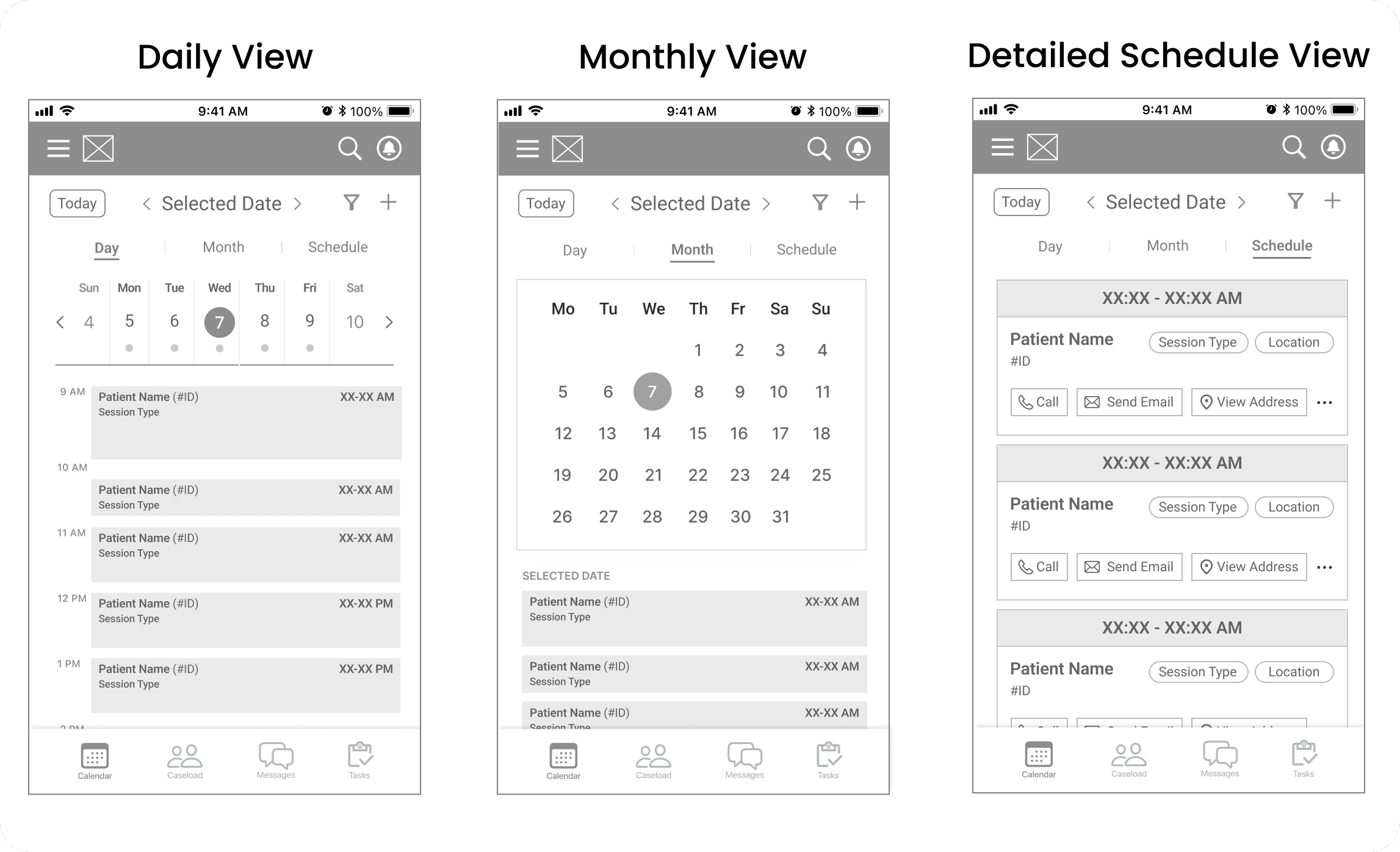
Mid fidelity wireframes of 3 schedule views (daily, monthly, detail)
Mid fidelity wireframe of daily schedule view
Mid fidelity wireframe of monthly schedule view
Mid fidelity wireframe of detailed schedule view

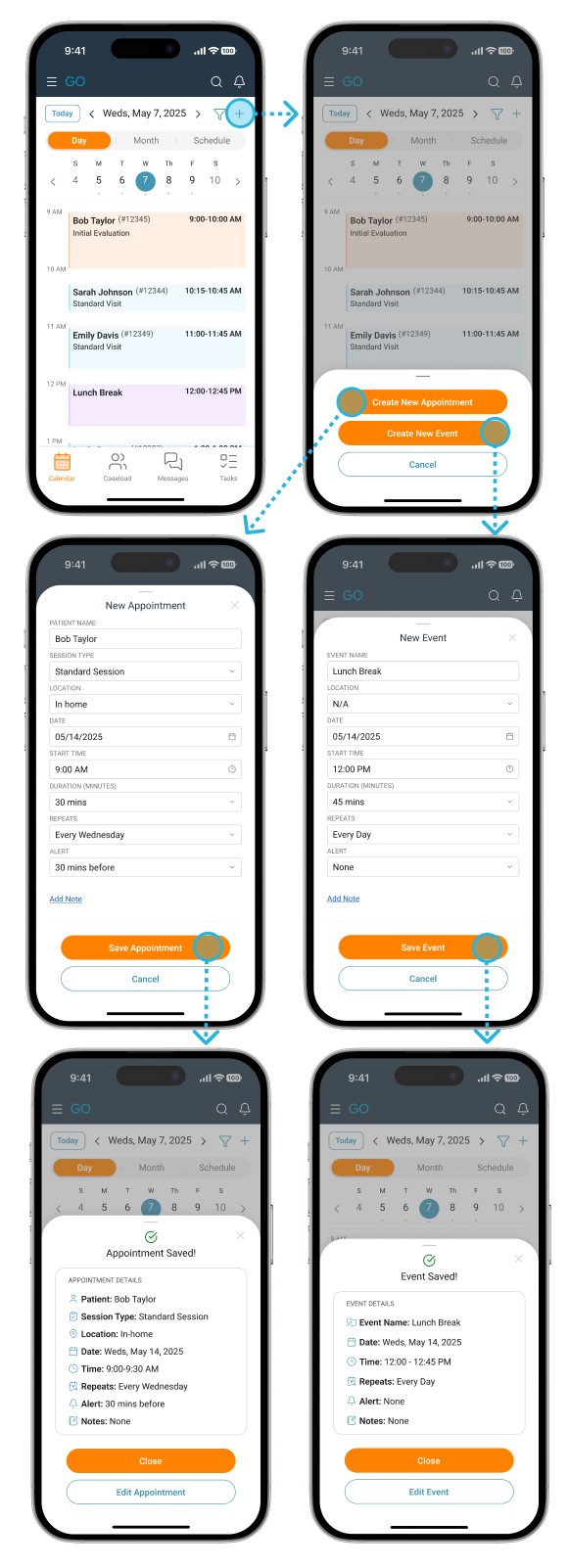
Mid-Fidelity: Create an Appointment
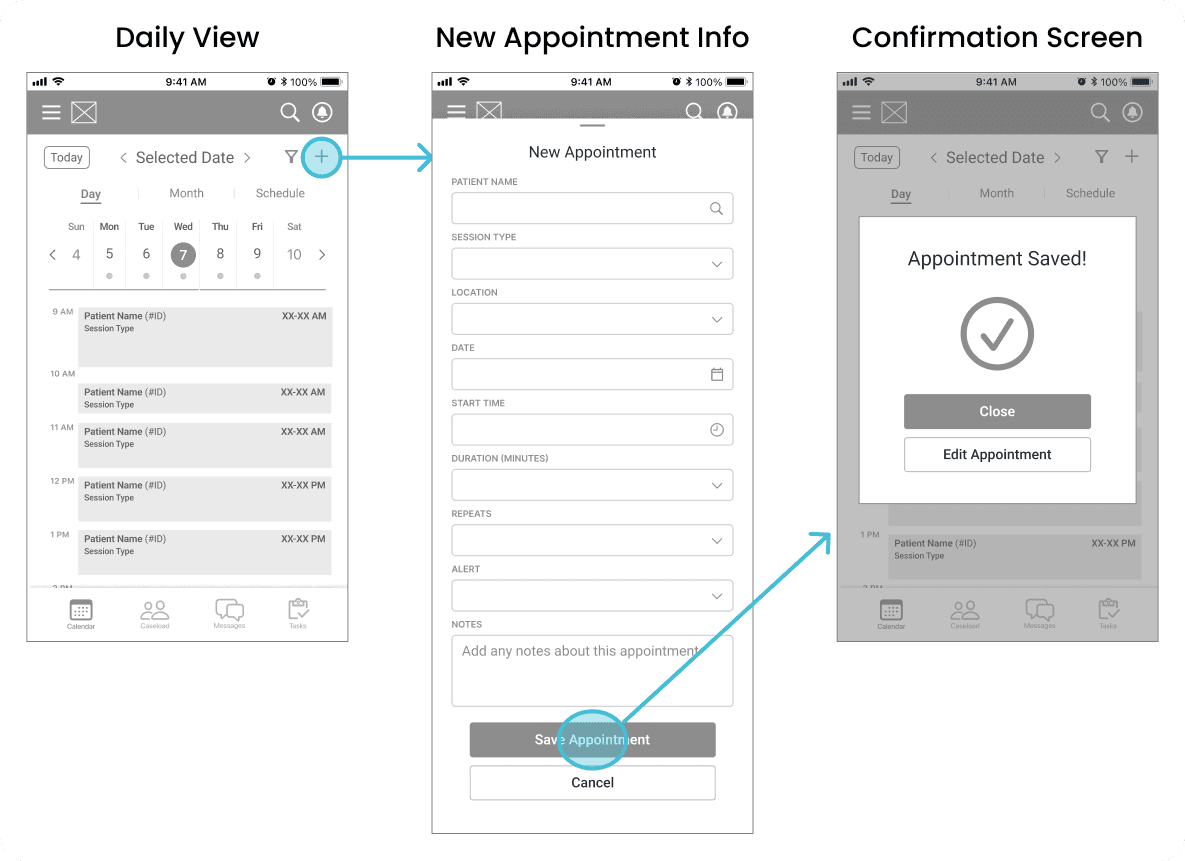
Mid fidelity wireframes showing "create an appointment" flow
Mid fidelity wireframe of daily schedule view
Mid fidelity wireframe of monthly schedule view

Mid-Fidelity: Mark Appointment as Arrived

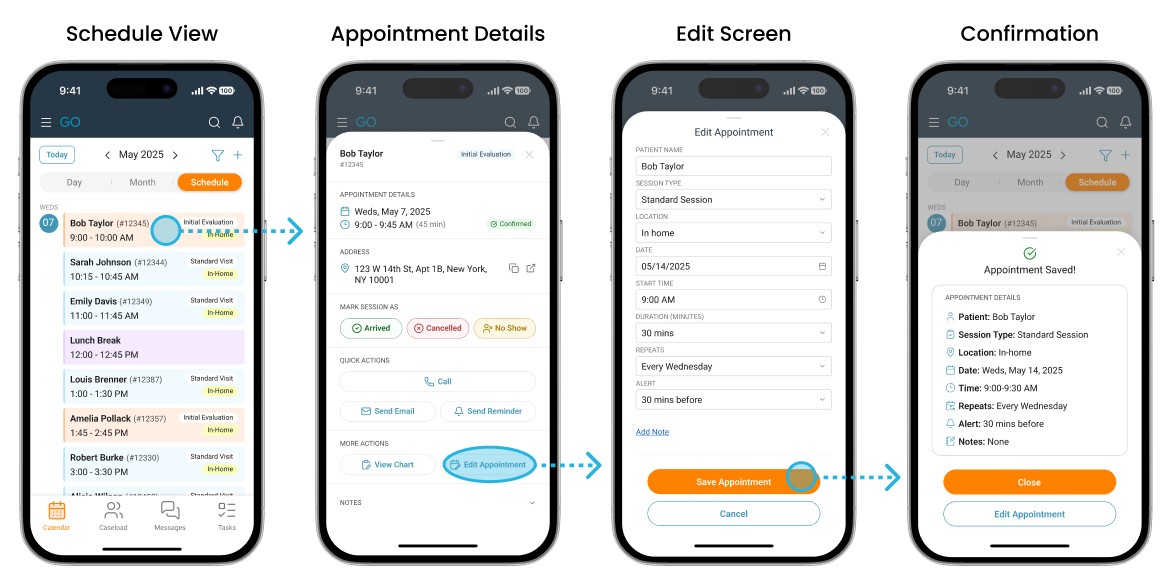
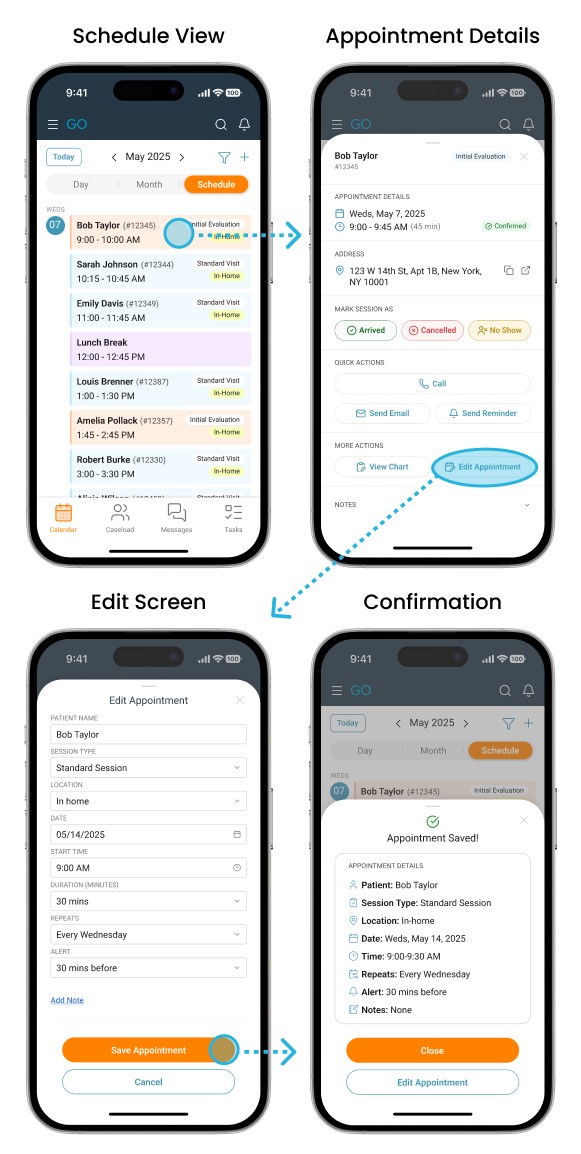
Mid-Fidelity: Edit an Existing Appointment
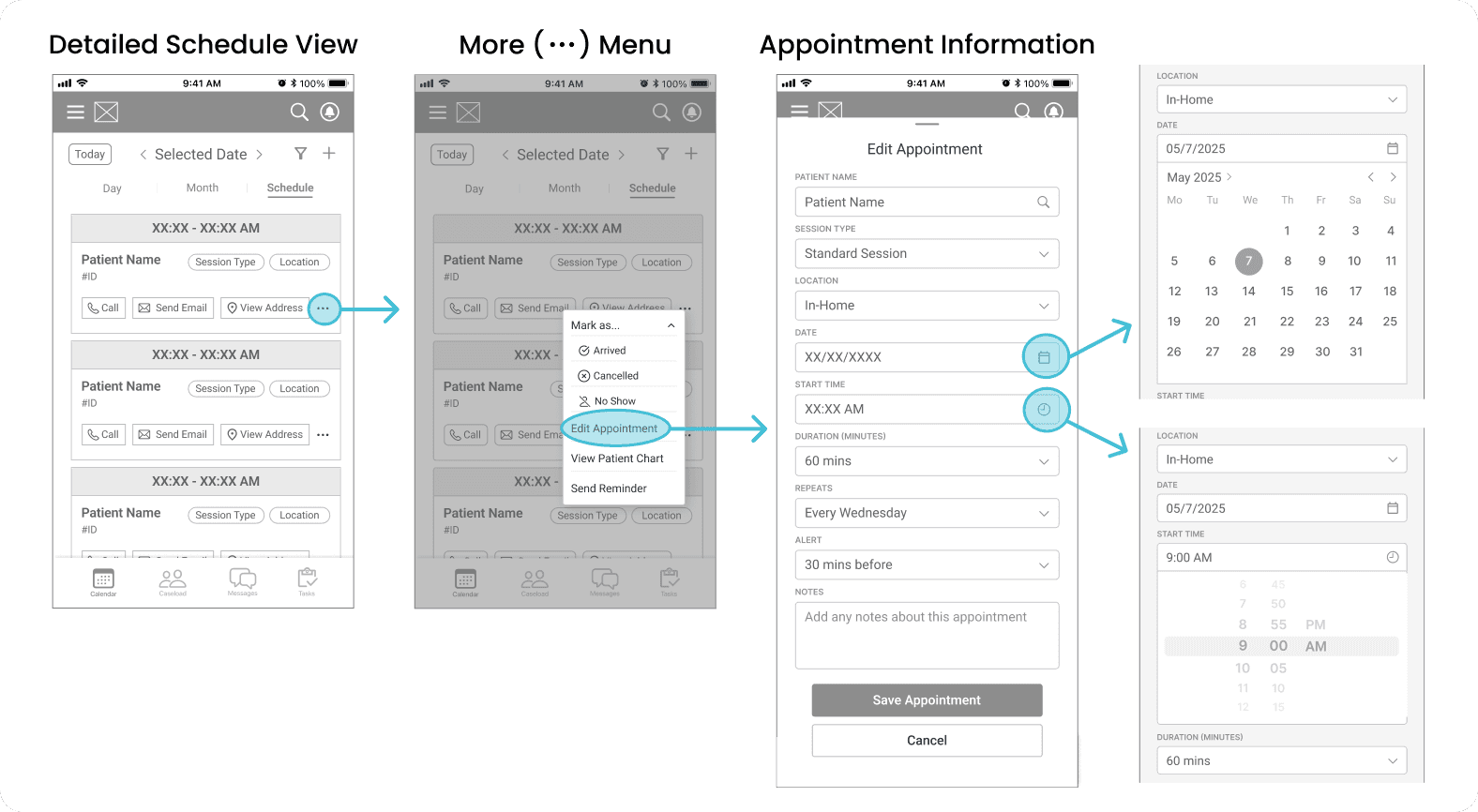
Mid fidelity wireframes showing "edit existing appointment" flow
Mid fidelity wireframe of daily schedule view
Mid fidelity wireframes showing "edit existing appointment" flow

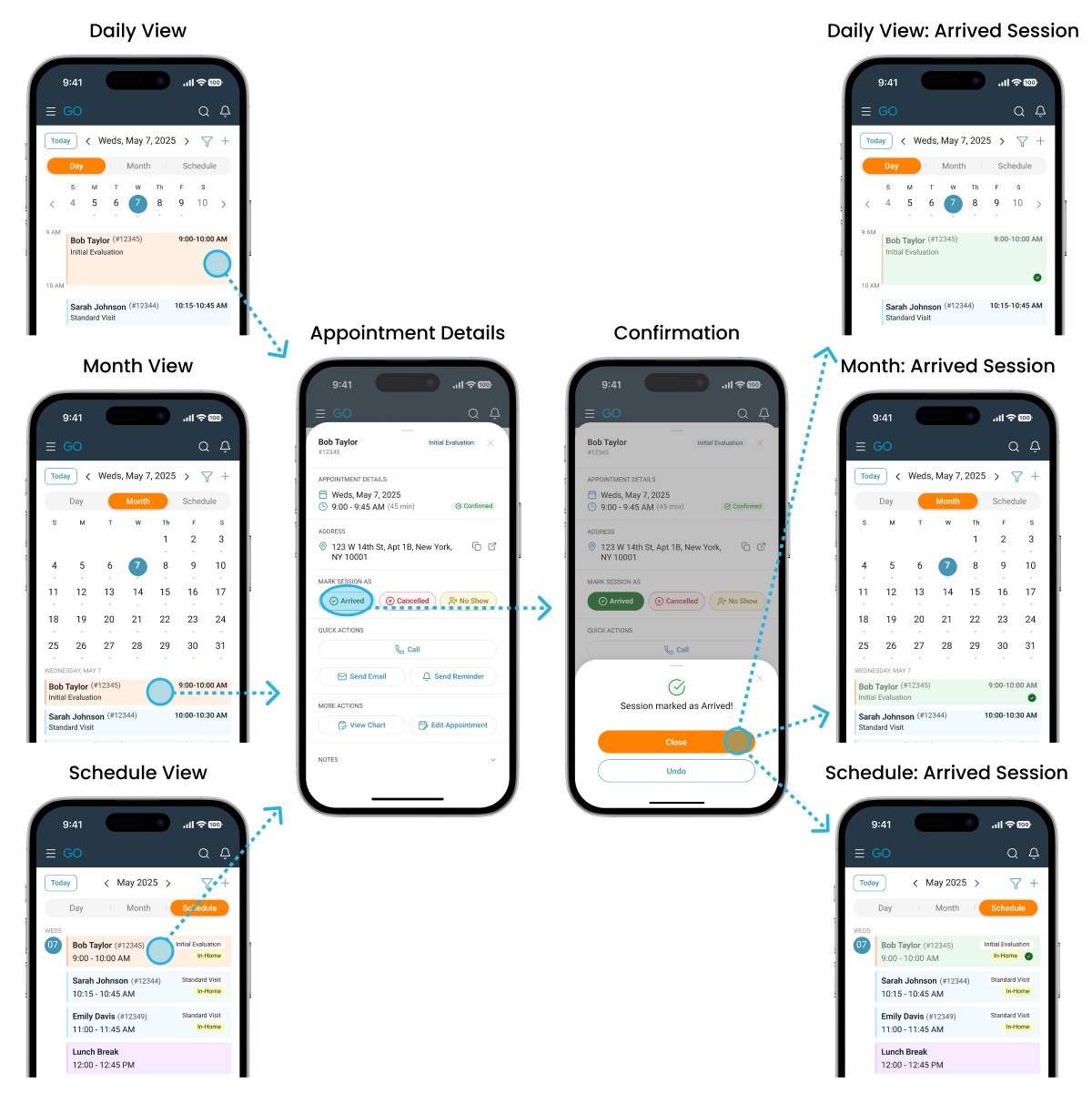
Mid-Fidelity: Mark Appointment as Arrived

Mid-Fidelity: Mark Appointment as Arrived

Mid fidelity wireframes showing "mark appointment as arrived" flow
Mid fidelity wireframe of daily schedule view
Mid fidelity wireframes showing "mark appointment as arrived" flow

Mid-Fidelity: Mark Appointment as Arrived

Hi-Fidelity Designs

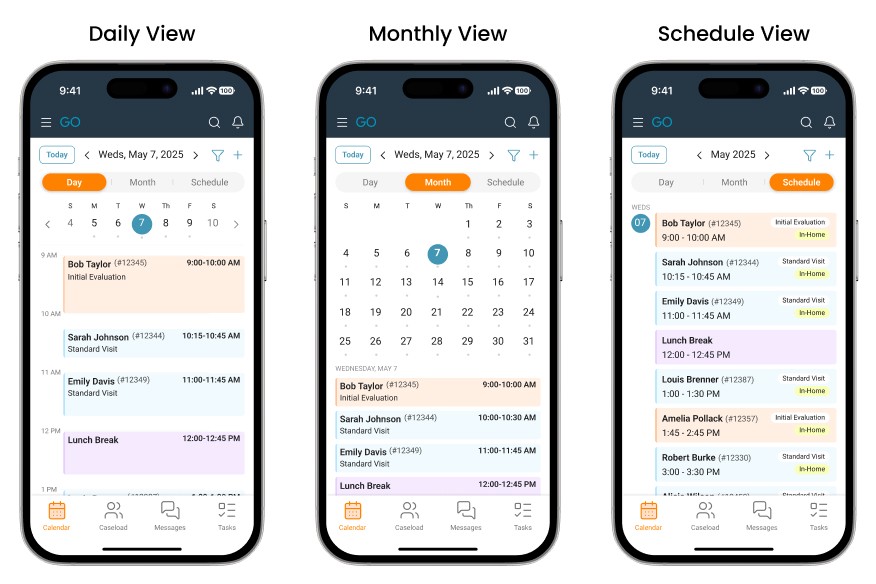
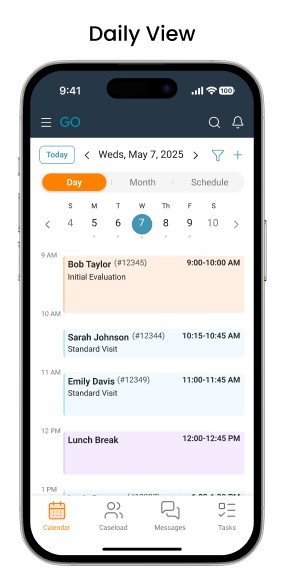
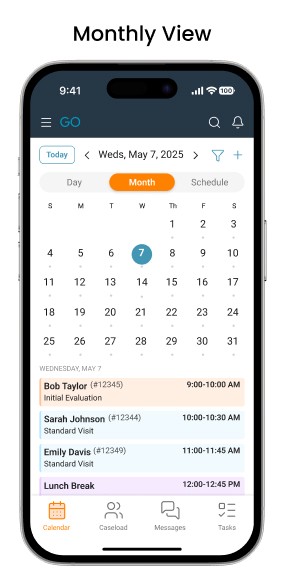
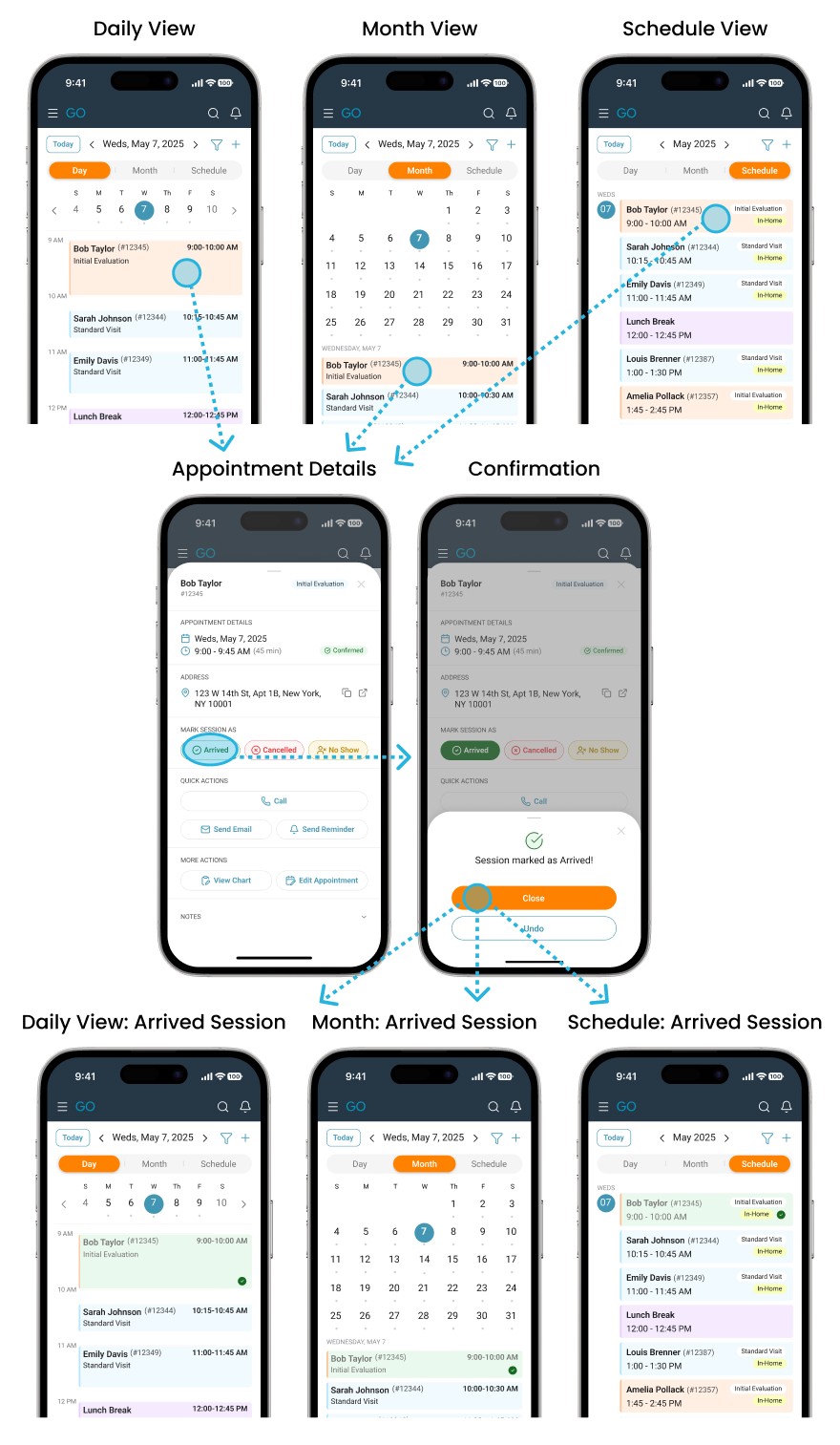
Once wireframes defined the structure, I moved into high-fidelity design to refine readability, optimize the existing visual system for mobile, and create an interface that felt modern and reliable in a healthcare context.

Hi-Fidelity: Schedule Views

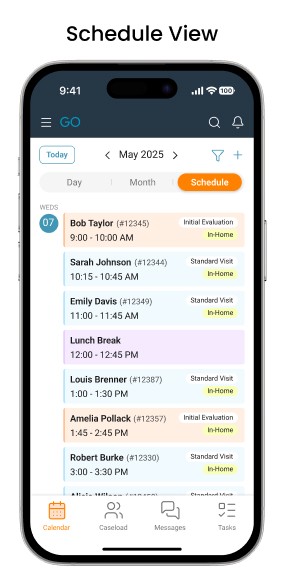
Hi-fidelity wireframes of 3 schedule views (daily, monthly, detail)
Mid fidelity wireframe of daily schedule view
Hi-fidelity wireframe of daily schedule view
Hi-fidelity wireframe of monthly schedule view
Hi-fidelity wireframe of daily schedule view
Hi-fidelity wireframe of detailed schedule view

Mid-Fidelity: Mark Appointment as Arrived

Hi-Fidelity: Create an Appointment

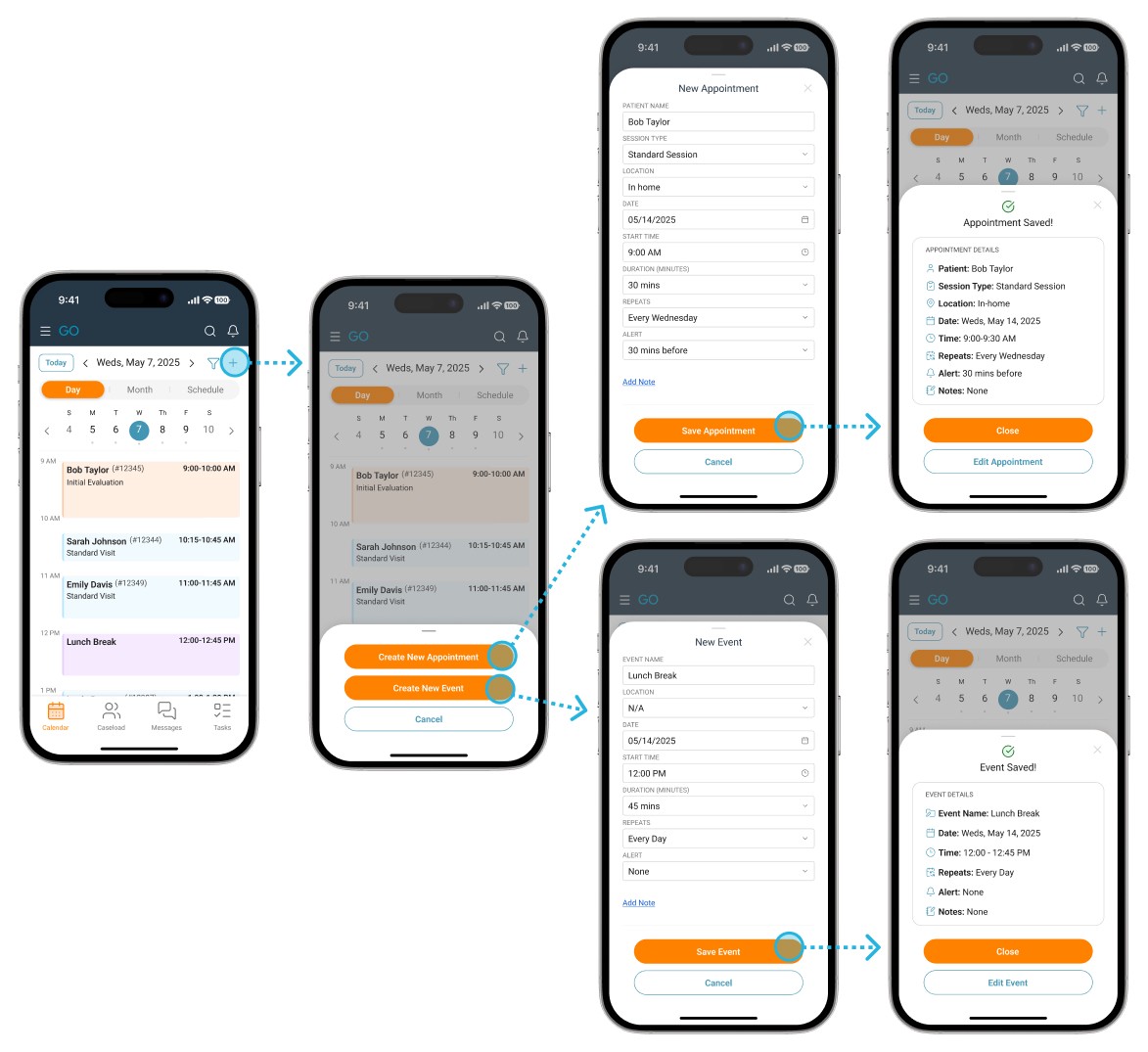
Hi-fidelity wireframes showing "create an appointment" flow
Mid fidelity wireframe of daily schedule view
Hi-fidelity wireframes showing "create an appointment" flow

Mid-Fidelity: Mark Appointment as Arrived

Hi-Fidelity: Edit an Existing Appointment
Hi-fidelity wireframes showing "edit an existing appointment" flow
Mid fidelity wireframe of daily schedule view
Hi-fidelity wireframes showing "edit existing appointment" flow

Mid-Fidelity: Mark Appointment as Arrived
Hi-Fidelity: Mark Appointment as Arrived

Hi-fidelity wireframes showing "mark appointment as arrived" flow
Mid fidelity wireframe of daily schedule view
Hi-fidelity wireframes showing "mark appointment as arrived" flow

Mid-Fidelity: Mark Appointment as Arrived
Visual Standards

To ensure consistency across the mobile experience, I documented the core visual elements: color palette, typography, and iconography.
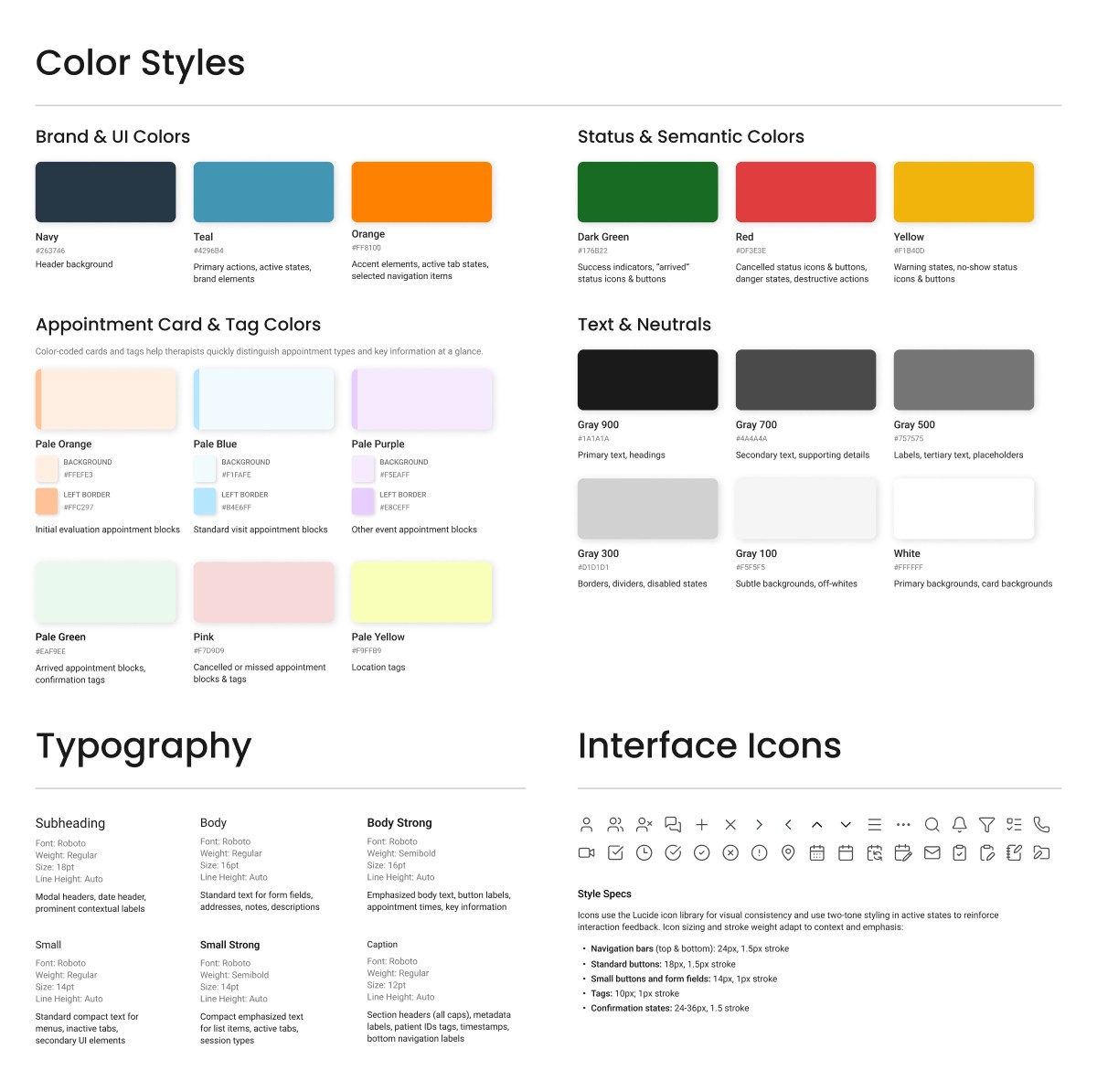
Image of basic style guide including color styles, typography, and interface icons
Mid fidelity wireframe of daily schedule view
Image of basic style guide including color styles, typography, and interface icons

Mid-Fidelity: Mark Appointment as Arrived

Key Design Decisions

1.

Functional color system built on existing brand palette

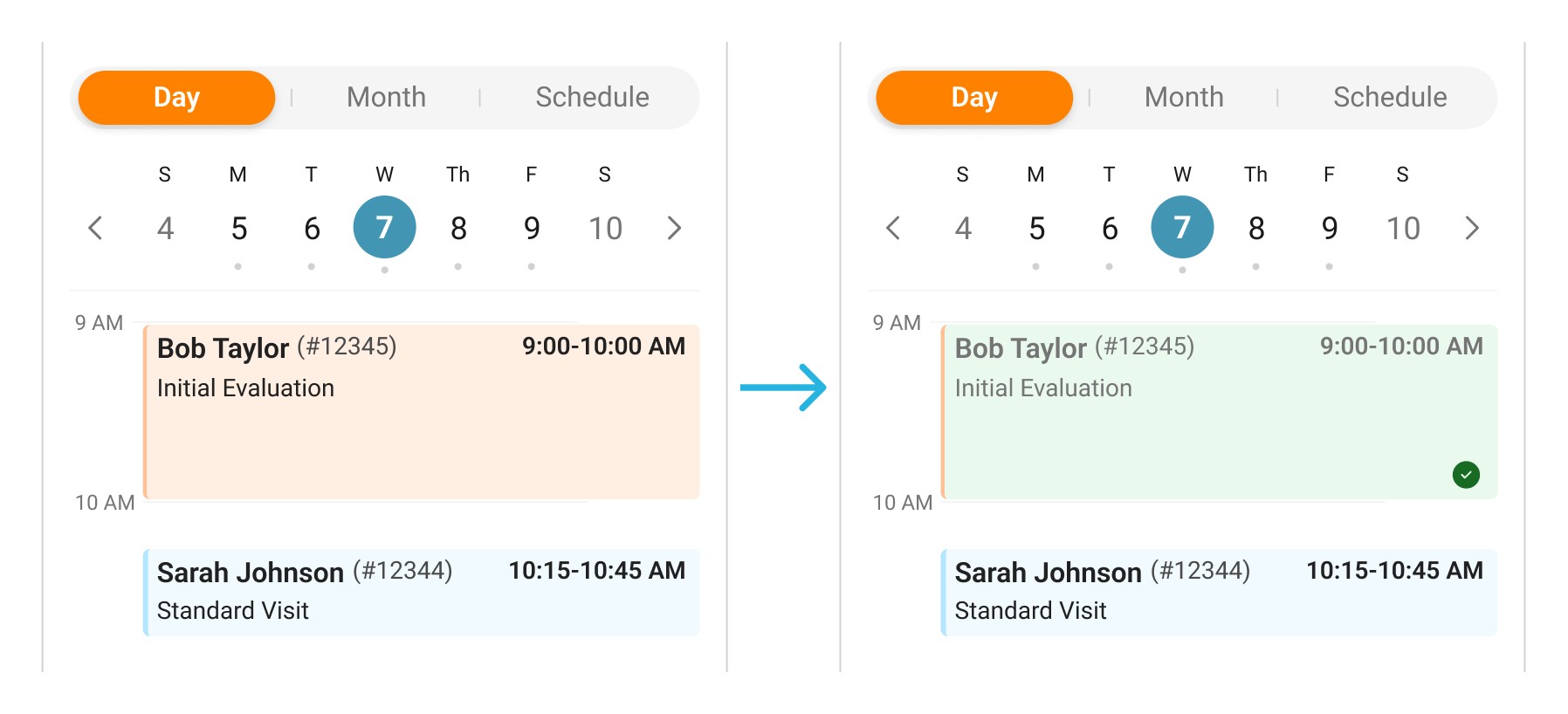
The redesign expands InsightGO's existing brand colors (navy, teal, orange) into a functional system with complementary pastels. Appointment cards use color-coded backgrounds (orange for initial evaluations, blue for standard visits) with darker left-border accents to help therapists quickly identify what they'll need for the day. When sessions are marked, cards shift to pale green (arrived) or pink (cancelled/no-show) while maintaining the type-indicating border. This dual-purpose system prioritizes appointment type during planning and completion status during execution.

Image showing appointment card color shift from orange to green to indicate arrived status

3.

Separate appointment and event creation flows

Patient appointments and events (lunch breaks, out-of-office time) now trigger distinct forms optimized for each purpose. Patient appointments require clinical information (session type, patient name, location), while events need only basic scheduling details. This reduces cognitive load by presenting only relevant fields for each task type.

2.

Unified Schedule View with consistent interaction pattern

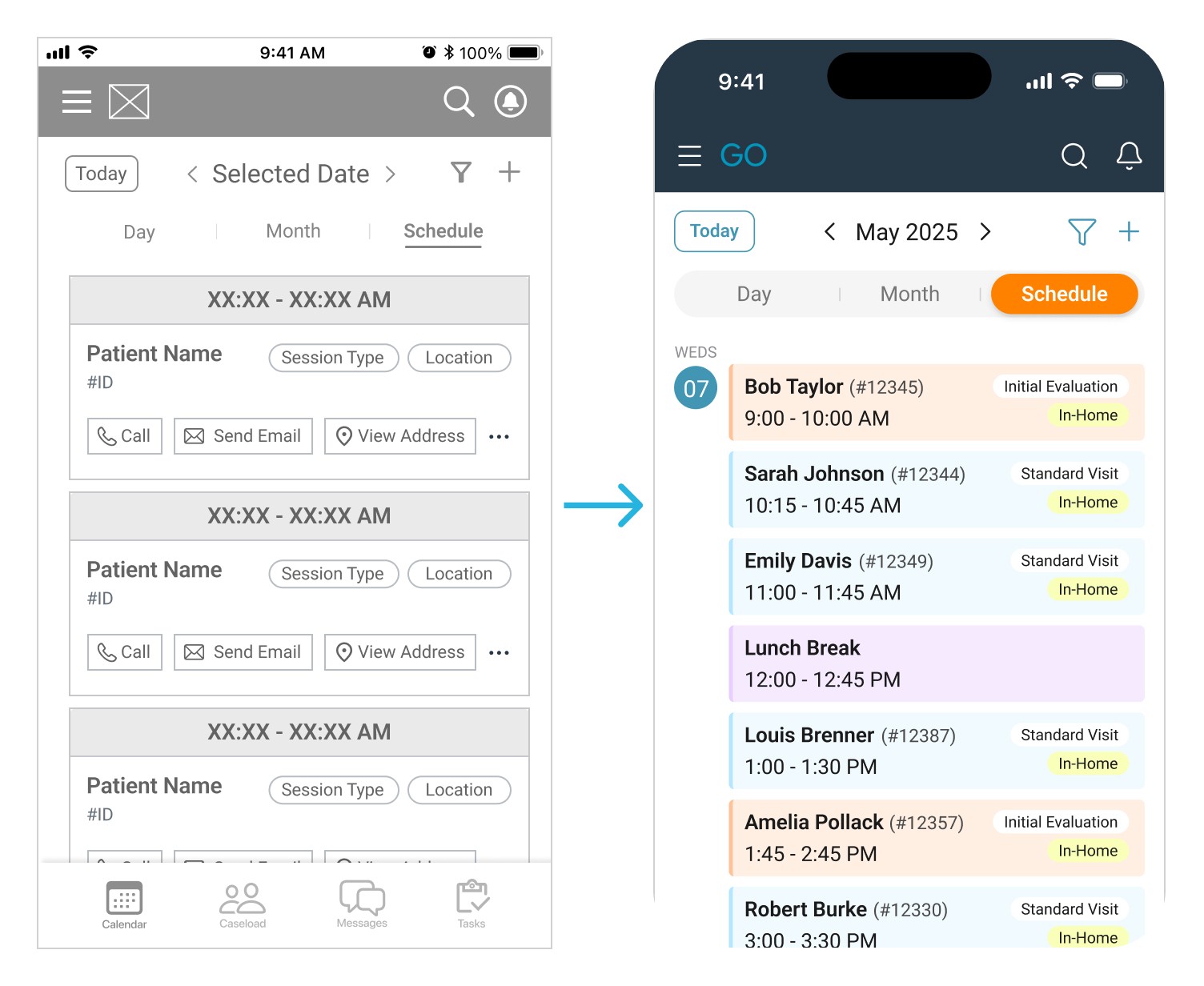
The Schedule View evolved from a detailed list with full appointment cards into a compact vertical timeline showing small colored blocks across multiple days. This mirrors Daily and Month views, allowing therapists to see more of their upcoming schedule in a scannable format. The interaction was also standardized: tapping any appointment in any tab view opens the same appointment details modal, eliminating the need to remember different navigation patterns per view.

Image showing progression from mid-fidelity schedule view to hi-fidelity schedule view

4.

Streamlined form inputs with progressive disclosure

On appointment/event creation forms, the Notes field evolved from an always-expanded text area into a collapsible "Add Note" button. Since most appointments don't require notes, this reclaims valuable vertical space while keeping functionality accessible when needed.

5.

Prominent confirmation feedback

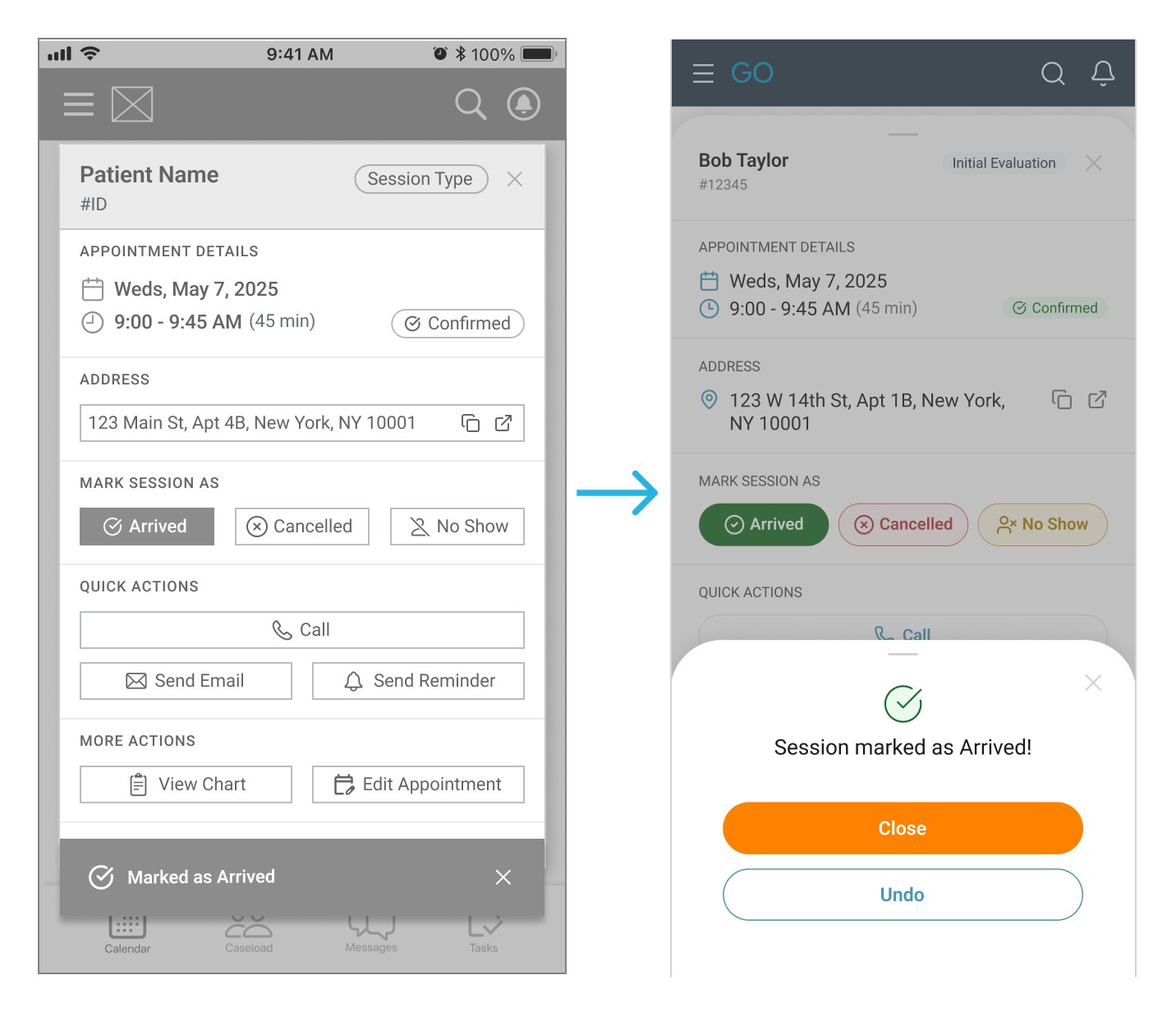
When sessions are marked as arrived, the confirmation evolved from a subtle toast notification at the bottom of the screen to a prominent slide-up modal with a large success icon and clear messaging. This more prominent treatment addresses the research finding that therapists don't trust the system to save changes reliably, providing immediate reassurance that the action registered.

Image showing progression of confirmation feedback from mid-fidelity to hi-fidelity

1.

Functional color system built on existing brand palette

The redesign expands InsightGO's existing brand colors (navy, teal, orange) into a functional system with complementary pastels. Appointment cards use color-coded backgrounds (orange for initial evaluations, blue for standard visits) with darker left-border accents to help therapists quickly identify what they'll need for the day. When sessions are marked, cards shift to pale green (arrived) or pink (cancelled/no-show) while maintaining the type-indicating border. This dual-purpose system prioritizes appointment type during planning and completion status during execution.

Image showing appointment card color shift from orange to green to indicate arrived status

3.

Separate appointment and event creation flows

Patient appointments and events (lunch breaks, out-of-office time) now trigger distinct forms optimized for each purpose. Patient appointments require clinical information (session type, patient name, location), while events need only basic scheduling details. This reduces cognitive load by presenting only relevant fields for each task type.

2.

Unified Schedule View with consistent interaction pattern

The Schedule View evolved from a detailed list with full appointment cards into a compact vertical timeline showing small colored blocks across multiple days. This mirrors Daily and Month views, allowing therapists to see more of their upcoming schedule in a scannable format. The interaction was also standardized: tapping any appointment in any tab view opens the same appointment details modal, eliminating the need to remember different navigation patterns per view.

Image showing progression from mid-fidelity schedule view to hi-fidelity schedule view

4.

Streamlined form inputs with progressive disclosure

On appointment/event creation forms, the Notes field evolved from an always-expanded text area into a collapsible "Add Note" button. Since most appointments don't require notes, this reclaims valuable vertical space while keeping functionality accessible when needed.

5.

Prominent confirmation feedback

When sessions are marked as arrived, the confirmation evolved from a subtle toast notification at the bottom of the screen to a prominent slide-up modal with a large success icon and clear messaging. This more prominent treatment addresses the research finding that therapists don't trust the system to save changes reliably, providing immediate reassurance that the action registered.

Image showing progression of confirmation feedback from mid-fidelity to hi-fidelity

Mid-Fidelity: Mark Appointment as Arrived

Try out the clickable prototype below!

Try out the clickable prototype below!

Future Directions

This redesign represents the first phase of a larger vision for InsightGO's mobile experience. The current prototype covers a focused set of core scheduling flows, a deliberate choice to keep the project manageable and ensure each interaction was thoughtfully designed rather than rushed. Several areas remain earmarked for future iterations:

1.

Tablet optimization

Since many therapists are provided tablets by their employers specifically for point-of-care documentation, a tablet-optimized version of the interface is a natural and important next step in making the redesign accessible across all devices clinicians use.

3.

Accessibility improvements

A formal accessibility audit across the full design system to ensure WCAG compliance, including touch targets, color contrast, and screen reader compatibility.

2.

Additional flows

The current prototype covers core scheduling interactions, with many additional flows still to be designed and prototyped. Progress note and evaluation templates in particular represent a significant redesign opportunity, substantial enough to warrant dedicated future work.

4.

User validation

Usability testing with real clinicians on the hi-fidelity prototype to validate design decisions and inform future iterations.

1.

Tablet optimization

Since many therapists are provided tablets by their employers specifically for point-of-care documentation, a tablet-optimized version of the interface is a natural and important next step in making the redesign accessible across all devices clinicians use.

3.

Accessibility improvements

A formal accessibility audit across the full design system to ensure WCAG compliance, including touch targets, color contrast, and screen reader compatibility.

2.

Additional flows

The current prototype covers core scheduling interactions, with many additional flows still to be designed and prototyped. Progress note and evaluation templates in particular represent a significant redesign opportunity, substantial enough to warrant dedicated future work.

4.

User validation

Usability testing with real clinicians on the hi-fidelity prototype to validate design decisions and inform future iterations.

1.

Tablet optimization

Since many therapists are provided tablets by their employers specifically for point-of-care documentation, a tablet-optimized version of the interface is a natural and important next step in making the redesign accessible across all devices clinicians use.

2.

Additional flows

The current prototype covers core scheduling interactions, with many additional flows still to be designed and prototyped. Progress note and evaluation templates in particular represent a significant redesign opportunity, substantial enough to warrant dedicated future work.

3.

Accessibility improvements

A formal accessibility audit across the full design system to ensure WCAG compliance, including touch targets, color contrast, and screen reader compatibility.

4.

User validation

Usability testing with real clinicians on the hi-fidelity prototype to validate design decisions and inform future iterations.

Reflections & Learnings

Looking back, the most valuable lesson from this project was the importance of front-loading structure. Jumping into wireframing before establishing a solid design system meant retrofitting components, reconciling inconsistent spacing, and rebuilding elements that could have been defined once and reused throughout. Even a rough style guide set up at the start would have made the later stages significantly more efficient.

That lesson proved especially relevant in a healthcare context, where function has to come first. A beautiful interface that slows a therapist down is a worse outcome than a plain one that doesn't, and every design decision in this project was weighed against that standard. This work ultimately laid the groundwork for a more thoughtful, clinician-centered approach to design, one that continues to inform how I think about building products for complex, high-stakes environments.

Try out the clickable prototype below!

Thank you!

Want to

get in touch?

get in touch?

Submit
Submit

Create a free website with Framer, the website builder loved by startups, designers and agencies.